Agentic Traffic: How AI Agents Browse the Web and What You Need to Know
For decades, websites have been (or should have been) built around humans: how they search, how they click, how they move around a page. All of it measured through one simple unit, the URL. But that model is starting to change. Why? Because today, part of web traffic no longer comes from people, but from agents: AI systems that act on behalf of users and that access content, interpret it and reuse it without seeing it as a website, but as a data graph. Welcome to agentic traffic.
And we have the numbers to prove it:
According to Tollbit data for Q2 2025, human visits to publisher websites fell 9.4% compared to the previous quarter, while AI bot requests skyrocketed and now account for 1 in every 50 visits, up from 1 in 200 at the start of the year.
The growth is exponential.According to Adobe data, traffic to US retail sites from GenAI browsers and chat services grew 4,700% year over year in July 2025. And the users who arrive this way are more valuable. They spend 32% more time on the site, browse 10% more pages and have a 27% lower bounce rate than traditional visitors.
The volume figures are even more striking. According to an analysis by Scot Wingo (founder of ChannelAdvisor), ChatGPT processes 2.5 billion prompts a day, and 2.1% of them are related to "shoppable products". That works out to 53 million shopping queries a day. Applying a 5-20% conversion rate and an $80 average order value, this translates into a potential $73 billion to $292 billion a year in GMV. The midpoint, $182 billion, would already rival the annual online sales of the largest US retailers. If platforms like ChatGPT took an 8% commission, that would mean $15 billion a year from agentic commerce alone.
Table of contents:
1. What is agentic traffic?
Agentic traffic means visits, crawls or calls to your content made by AI agents, not by humans or classic crawlers.
Unlike a traditional bot, which crawls pages in bulk without any context, an agent acts on someone else's behalf (a user's or an application's), moves around the web to complete specific tasks, and does so in a contextual, one-off and outcome-driven way. The value exchange is direct and measurable: reading, comparing, writing, buying or verifying something for someone.
Note: agentic traffic isn't limited to conversational agents. It also includes intermediate calls and automations inside AI workflows (RPA+AI, orchestrations, pipelines) that carry out steps on behalf of the user or the main system.
1.1 Agents with full UI / browser control (Computer Use)
These are the most sophisticated ones. They run on real browsers (often in headless mode), render pages, read the DOM and can interact with the interface the way a human would: clicking, filling in forms, navigating dropdown menus, scrolling.
In logs they show up as a real browser (full headers, resource downloads), with precise navigation and short-to-medium sessions (usually from a few seconds to a few minutes, <= 5).
These agents are guided visually: they analyze the layout using computer vision and spatial reasoning to decide which element to interact with or how to move a task forward.
1.1.1 Consumer AI browsers
These are the ones end users install or use to browse, but with an agent built into the browser itself. Examples:
ChatGPT Operator: the agent can open pages, click or complete actions from inside the chat.
Atlas (OpenAI), Comet (Perplexity) or Dia (The Browser Company), which build an AI agent right into the browsing experience.
Claude for Chrome (Anthropic, preview), which lets the model read and act on the active tab.
Beyond the model itself, the AI browser race is really about capturing real usage data (history, context, task patterns) that will feed the next training cycles.
1.1.2 Computer Use models and APIs (for developers)
This is where Gemini 2.5 Computer Use (Google), Claude Computer Use (Anthropic) and OpenAI Computer Use come in. These are models specialized in controlling graphical interfaces through an iterative loop (the agent loop) that observes the environment (screenshot + URL + action history), decides on an action (click, scroll, type) and executes it, again and again until the task is done.
Their "via API" access doesn't mean they download HTML directly. It means they control a real browser through an actions API. Runtime environments like Browserbase, Playwright or Puppeteer also operate at this level. They aren't models themselves, but headless browser layers that agents can be deployed on top of.
1.2 Agents without UI control
These agents don't visually control the interface on their own, although they can run scripted interactions (clicks, scrolls, inputs) inside a headless browser as part of a script or predefined flow. They don't “decide” which element to click. They follow deterministic instructions or selectors set by the workflow.
Even so, they're often part of agentic workflows or AI automations where the main agent hands off reading, extraction or validation steps to these execution services.
If the task requires visual reasoning or dynamic decisions about the UI, then it escalates to Computer Use mode, where the model acts on a real browser in an observe-and-act loop.
1.2.1 With JavaScript rendering
These agents use a real headless browser (Chromium, Playwright, Puppeteer) and execute JavaScript to get the full DOM, replicating what a user would see once the page has fully loaded. Unlike Computer Use agents, they don't make visual decisions: their purpose is to render and read, not to interact.
They wait for async promises and the typical events of frameworks like React, Vue or Next.js to finish (including lazy-loaded content or content mounted via XHR) before capturing the resulting HTML.
Notable examples include Firecrawl (based on Playwright) and Jina AI Reader (Puppeteer + Readability + Turndown), as well as modern scrapers built with Puppeteer/Selenium that follow the same logic when the content depends on the client.
This group also includes Gemini's "search agents", and even Gemini's web fetch via API, which uses Chromium (Googlebot/WRS) to render JavaScript when the model needs grounding or access to up-to-date content. That said, AI Mode doesn't fetch, it queries Google's index directly.
In logs: full resource downloads (JS, CSS, images), a Chrome- or Googlebot-style user agent, 1-5 second latencies, and no real interaction events, although there may be synthetic scrolls or script-triggered events to force rendering.
1.2.2 Without rendering (plain HTTP)
The most basic, fastest and cheapest ones. They access content through direct HTTP requests, without executing JavaScript, and process the initial HTML as text or a flat DOM, often converted to Markdown so it can be consumed in the agentic flow. What does that mean? That if the page depends on client-side JS, they won't see the rendered content.
This group includes AI assistants like ChatGPT or Claude when they run a web_fetch in the background to answer a user's question, automation tools like n8n HTTP Request, or basic scrapers in an AI workflow built with requests (Python), curl or axios, which don't execute JS.
In logs: 1-2 requests per URL, very short dwell times, no subresource downloads and no client-side events.
This kind of access is common in agentic workflows or automation pipelines, where the main agent hands off reading or validation steps to lightweight fetch services.
1.3 The pre-agentic or training level
Finally, there are AI crawlers that don't carry out delegated tasks. Instead, they feed datasets or indexes that agents will later build on. For example GPTBot, ClaudeBot, CCBot (Common Crawl), Meta-ExternalAgent (Meta), Google-Extended (which isn't actually a separate crawler, but a robots.txt token that controls whether Google can use your content to train Gemini), etc.
They don't generate agentic traffic in the strict sense. They're hits from AI systems that lay the groundwork for future visibility. You could say they're the “level zero” of AI traffic, where models learn what exists on the web before acting on it.
2. What do we know about how well these agents perform?
The promise is huge, but the execution is still very immature. Where agents fit best today is in coding tools, but on "complicated" web tasks, reliability still falls short. I've been working with them for months and, overall, they're pretty disappointing. TheAgentCompany benchmark found that even the best agent tested (Gemini 2.5 Pro) failed 70% of the time when carrying out real tasks. And that's even counting partially completed tasks.
The main causes of failure are:
Poor navigation of web interfaces.
Inability to handle private or incomplete data.
High vulnerability to compounding errors and hallucinations.
Hands-on tests with OpenAI's Atlas Agent Modeshow similar results. Across six varied web tasks (playing 2048, creating Spotify playlists, scanning emails, building a fan site, choosing electricity plans, downloading Steam games), the agent got an average score of6.83/10. It does relatively well on simple, structured tasks: for example, it created a radio playlist on Spotify (9/10), scanned 164 emails to pull PR contacts into a spreadsheet (8/10), and picked a competitive electricity plan in Texas (9/10). But it gets stuck in endless loops when interfaces are less clear: while trying to download game demos on Steam, the agent spent ten minutes looking for filters that didn't exist and never managed a single download (1/10).
The biggest limitation is that "technical constraints on session length" cut most tasks off after a few minutes, just when they were starting to be useful. This means the agent can't complete repetitive, time-consuming tasks, which are exactly the ones we'd want to automate.
Other experiments happening in ecommerce right now also show problems. Perplexity, for example, still has several problems with its shopping features. You can only buy one product at a time (there's no cart), and many sellers don't even have a way to update their product information directly, so the data is often out of date because it's collected by scraping. Limitations this basic show that agents still have a long way to go before they can handle complex transactions truly reliably.
This has a direct impact on any business that relies on structured online tasks, like purchases, forms, CRM, medical appointments... If the content isn't well structured, or if it requires too much non-standard interaction, the agent probably won't understand it, or will get it wrong. As we'll see next.
3. What changes for SEO and for website owners?
It no longer matters so much that a URL ranks for "washing machine X price". What matters is that the machine can get in, understand how to navigate the site, and retrieve and validate that "washing machine X costs €399".
Agents prioritize price, ratings, delivery speed and real-time inventory over brand familiarity or loyalty, which could completely reshape how retailers compete and how purchase decisions are made. In other words, the growth of "zero-click search" and agent-driven interactions is eroding direct traffic to websites, along with retailers' ability to observe, influence and understand consumer behavior at scale.
It's also important to understand that we're looking at a fundamental shift in the search model. Google could lose 95% of its search volume and still grow its revenue, as long as it keeps the queries that are valuable to it (mainly commercial ones). AI is eating the informational queries with little monetary value first (like "how many protons does cesium have?"), while searches with purchase intent ("best padel racket"), where the real money is made, are safe for now.
And AI platforms know it. According to eMarketer, AI search ad spending in the US will reach $26 billion in 2029, roughly 14% of total search ad spending. Formats like Perplexity's sponsored questions (running into trouble again), Google's AI Max or Grok's in-chat ads represent a new model of conversational paid media that will compete directly with traditional Google Ads.
Either way, for all this to work, content has to be readable by humans, but also accessible to and processable by machines.
3.1 The birth of AX (Agent Experience)
Agent Experience is User Experience for agents. If agents can't complete their goals, neither can users. Bad AX translates into bad UX = unhappy or lost users. I think this opens the door to a new debate, like the SEO vs GEO one.
In my tests with browser agents, I've seen the agent leave a DTC client's website and go to a marketplace, simply because there it could actually complete the task I'd given it.
AX doesn't mean full delegation
But there's an important nuance: AX isn't just about optimizing so the agent can complete everything autonomously. It also means recognizing when the user wants to take back control.
According to Forrester's analysis of conversational commerce, today's automated experiences are "more assistive than agentic" and have a recurring problem: they assume shoppers don't really want to browse. For low-consideration products (batteries, detergent), delegating works. But for high-consideration products like clothing, electronics or specialty items, browsing is still preferred, fun or necessary.
This has direct implications for AX:
Your site should let the agent extract information quickly (prices, availability, specs) to help the user compare.
But it should also be ready to welcome the user when they want to see more, compare visually or explore the catalog on their own.
The best flows aren't "the agent does everything" or "the user does everything". They're hybrid: the agent discovers, filters and compares, but the user decides when to take control.
That's why good AX isn't about making your site "navigable only by agents". It's about making it navigable both by agents and by the humans who arrive after interacting with those agents. It's not agent OR human, it's agent AND human working together. Or, put another way, guided selling augmented with generative AI.
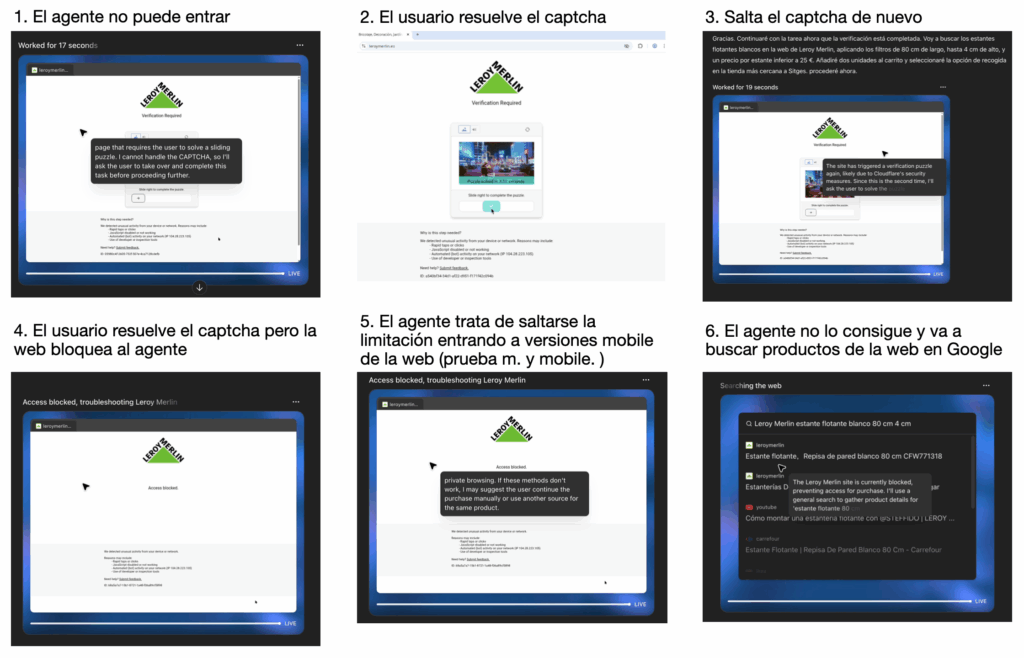
Here's a challenge for you. Ask ChatGPT's agent, Operator, to complete a task on your website, any task that makes sense for what you offer. You'll see how many errors it runs into. What problems have I run into myself?
Blocked by firewalls.
Tasks that don't complete because of timeouts.
Interaction problems caused by markup with poor accessibility.
Mistakes telling the main product apart from the recommended ones, because of a poor HTML hierarchy.
And my favorite: mistakes caused by usability problems. The agent behaves like a new user (keep in mind it browses on desktop with a small screen resolution and viewport, with everything that implies) and without the "curse of knowledge". This is brilliant, and ideal for "user" testing.
And I'm not talking about small sites. I've seen all these problems on client sites that are among the biggest ecommerce sites in Spain.
In fact, a recent analysis that evaluated more than 100 tasks with ChatGPT Agent mode confirms the scale of the problem I'm talking about. 63% of first visits ended in an immediate bounce because of 4XX/5XX errors, unexpected redirects, slow pages or CAPTCHA blocks. And of the visits that got past that initial barrier, only 17% managed to complete the conversion. The main causes of abandonment it identified include badly designed forms, premature or unclear sign-up requirements, and pop-ups covering the conversion buttons. The study also found that 46% of agent visits happen in reader mode (text/HTML only, no CSS or JavaScript), which further underlines the importance of the semantic HTML and accessibility we mentioned.
Here's an example on Leroy Merlin, the home improvement retailer (not a client, but they've already been warned):
3.2 Semantic HTML and APIs as the foundation of AX
Semantic HTML: the starting point
Beyond technical SEO, I firmly believe that semantic HTML is no longer just an accessibility issue. It's the anchor point for agents, smart browsers, ethical scraping and language models. The clearer and more consistent your markup, the fewer errors you'll cause this new kind of traffic. This isn't just my opinion. I'm basing it on evidence and on a good handful of papers showing how sites that follow accessibility standards and use semantic HTML help agents with grounding and agentic navigation tasks.
But semantic HTML is only the beginning. Agents also need content to be optimized so it can be understood, cited and used. And here's the good news: if you were already doing good SEO, you're already prepared.
As I explain in detail in my analysis of SEO for AI, optimizing so that ChatGPT, Perplexity or Gemini cite you in their answers doesn't require new acronyms (GEO, AEO, LLMO...). It's simply the logical evolution of the semantic SEO we should have been doing since 2013.
Why structure matters: evidence from agent training
A recent Google paper (SAGE) provides direct evidence of why this matters. The study looks at how to train agents for "deep search", meaning tasks that require multiple steps of searching and reasoning (between 2 and 10 hops on average, compared to 1-2 in traditional benchmarks).
The interesting part is the "shortcuts" they identified, that is, the patterns that reduce search complexity for the agent:
Information Co-Location (35% of cases): when two or more pieces of information needed for the answer are in the same document, the agent solves in a single hop what should have taken several searches.
Multi-query Collapse (21%): when a single well-phrased query retrieves enough information from different documents to solve several steps at once.
The implication for AX is that if you put semantically related content on the same page (or on well-linked pages), you reduce the number of hops the agent needs and increase the chances it uses you as a source. I'm not speculating. This is how Google is training its agents to navigate the web.
APIs and feeds: alternatives to scraping
We're already seeing partnerships between agents and companies to access their data via API, which improves the reliability and speed of the answers. Look at the deals OpenAI and Perplexity have with Tripadvisor, Booking and Uber. Just as I said months ago: offering these critters alternatives to scraping, whether through APIs, feeds or structured data (JSON, XML), was going to become a trend.
This is where the OpenAPI specification comes in. It's used to describe and validate how APIs are used: which endpoints exist, which parameters they accept, what they return and what errors they can throw. For agents, a well-published OpenAPI contract means being able to execute actions reliably and securely, going beyond just reading the page content.
In fact, OpenAPI is already used in production by ChatGPT (in its plugins and custom GPTs), Google (Gemini + Workspace APIs) and Anthropic (Claude with Tools). And in parallel, companies like Stripe, Twilio, Shopify, Slack, Booking and Uber publish their APIs in OpenAPI format so they can be consumed in a secure, documented and predictable way.
The llms.txt standard is actually already being used with this same logic. Google publishes llms.txt and llms-full.txt in the docs for its Agent Development Kit (ADK) so that tools like Gemini CLI, Claude Code or Cursor can consume the documentation directly through MCP servers, without having to scrape it.
The standards for agentic shopping: ACP and UCP
In ecommerce specifically, two competing protocols have emerged, each aiming to become the standard for transactions carried out by AI agents.
OpenAI and Stripe launched the Agentic Commerce Protocol (ACP) in September 2025, the open standard that powers Instant Checkout in ChatGPT. This protocol solves exactly the problems we saw with Perplexity: it defines how agents should manage multi-product carts, process payments with secure tokens (like Stripe's Shared Payment Token), handle real-time inventory and complete complex transactions without relying on scraping or simulated clicks. ACP sets out a standardized contract that covers product discovery, checkout session management, payment authorization and order confirmation. It's already live in ChatGPT with merchants from Etsy, Walmart and more than a million Shopify stores (Glossier, SKIMS, Spanx, Vuori...). PayPal has also joined, announcing its integration with ChatGPT to support Instant Checkout alongside Stripe.
Google responded in January 2026 with the Universal Commerce Protocol (UCP), unveiled by Sundar Pichai at NRF 2026, the big US retail trade show. Unlike ACP, which focuses on checkout, UCP covers the entire shopping cycle: discovery, transaction, post-purchase, returns and loyalty programs. It was co-developed with Shopify, Walmart, Target, Etsy and Wayfair, and is backed by Visa, Mastercard, Stripe, American Express, PayPal and 20+ other partners.
The key differences between the two protocols are:
Scope: ACP is limited to checkout; UCP covers the full cycle, including post-purchase and loyalty.
Architecture: ACP is centralized (merchants have to apply to OpenAI to appear in ChatGPT); UCP lets stores publish their capabilities at /.well-known/ucp on their own domain, without depending on a gatekeeper.
Payments: ACP is tightly coupled to Stripe; UCP is processor-agnostic (Google Pay, PayPal, any network).
Surface: ACP runs in ChatGPT; UCP runs in Google Search AI Mode, Gemini and Google Shopping.
Interoperability: UCP says it's compatible with MCP, A2A and AP2; ACP is a more closed ecosystem.
Both protocols are open source under the Apache 2.0 license. The reality is that this isn't VHS vs Betamax: merchants who want to maximize their reach will have to support both, just like people build for both iOS and Android today. Google has the advantage of its Shopping Graph (50 billion listings, 2 billion of which are refreshed every hour) and the installed base of Merchant Center. OpenAI has 700 million weekly ChatGPT users who are already asking it what to buy. The battle has only just begun.
NLWeb: conversational endpoints for your site
While we wait for these protocols to mature, there's already NLWeb, an open protocol backed by Microsoft that defines two standard endpoints so both people and agents can query your site in natural language:
/ask: a conversational endpoint for questions and answers.
/mcp: an MCP (Model Context Protocol) endpoint for trusted agents and tools.
The advantage is that you no longer depend on fragile scraping to expose structured answers and actions to agents, and you don't force them to emulate a human clicking through the UI. Cloudflare implements it with AutoRAG + NLWeb Worker: it crawls your rendered site, indexes it and automatically deploys those endpoints on your domain (e.g. ask.yourdomain.com/ask). It even includes an embeddable snippet to add conversational search to your site.
WebMCP: your frontend as an MCP server
NLWeb handles conversational access from the backend. But what happens when the agent is already on your page and needs to interact with it? This is where WebMCP comes in, a proposed web standard that Google and Microsoft are jointly incubating in the W3C Web Machine Learning Community Group.
The idea is that instead of an agent having to screen-scrape, interpret the DOM or simulate clicks to complete a task, your site explicitly tells it what it can do, how to call each action and what parameters it needs. Your frontend literally becomes an MCP server.
You don't need to set up a separate MCP server in Python or Node.js. You reuse the logic you already have in your frontend. And according to the project's initial benchmarks, structured calls via WebMCP use 89% fewer tokens than screenshot-based workflows, because the agent gets JSON instead of having to process images of the screen.
The big picture
With this, AX is no longer just about "making the DOM readable". It becomes about offering an explicit contract for queries and actions. Agents need much more than well-structured HTML, especially for commercial tasks: they need unified APIs to move between platforms, memory to remember preferences and price thresholds, and access to reliable, up-to-date data.
Without these pieces, LLMs will remain mere "smart summarizers" rather than commercial agents. As we saw with Perplexity's ecommerce problems, even basic features like a multi-item shopping cart require infrastructure that doesn't exist yet, or that's only starting to mature with protocols like the ones above.
3.3 AX is also about security and privacy
But there's another dimension, because AX is also about security and privacy. It's no use having an agent complete a task well if, at the same time, it opens the door to a prompt injection attack.
The underlying problem is that these agents can't tell legitimate user instructions apart from malicious instructions injected through web content. When an agent reads a page, an email or a calendar event, it treats all of the text as potentially executable.
Brave demonstrated this with Comet (Perplexity): with a simple Reddit post, they were able to trick the agent into stealing emails, OTPs and private data. And it even works with practically invisible text (light blue on yellow) embedded in images. Fellou Browserhas the same problem: simply asking it to navigate to a site makes it automatically send that page's content to the LLM, which lets malicious instructions change what the agent does.
OpenAI Atlas is vulnerable too. And not just to prompt injection: the browser builds a "trove of memories" about everything you do online, and they stay on its servers for 30 days. A researcher at the Electronic Frontier Foundation found that Atlas had saved memories about signing up for sexual and reproductive health services and even the names of real doctors. The privacy controls are confusing (your Atlas memories are separate from your ChatGPT ones), incognito mode doesn't hide you from ChatGPT, and although you can delete them, it takes constant, active effort.
The risk multiplies when you connect tools (MCP) to these agents. We're seeing attacks in production right now:
ShadowLeak: someone sends you an email with commands hidden in the HTML (tiny text or white on white). When you ask the agent to "summarize my emails", it reads the trap, extracts personal information from other emails and sends it to the attacker. It all happens on OpenAI's servers, without you seeing a thing.
Calendar poisoning: you get a calendar invite with a malicious prompt in the description. You don't even need to accept it. Just telling the agent "get me ready for tomorrow" is enough for it to read your calendar, process the jailbreak and leak your data.
In other words, anyone who can write text that your agent reads can control what that agent does next. Agents don't have "common sense", they just obey what they read. That's why MCPs are dangerous: they bring together the lethal trifecta of private data + untrusted content + the ability to communicate externally.
In fact, a recent security study on MCP has shown how serious the problem is. Researchers at Leidos tested standard MCP servers (filesystem, Slack, Chroma) with Claude 3.7 and Llama-3.3-70B and managed to carry out three types of attacks:
Malicious code execution (MCE): inserting commands into files like .bashrc that run every time you open a terminal
Remote access control (RAC): adding SSH keys to the system for permanent access
Credential theft (CT): extracting API keys from environment variables and sending them via Slack
The most worrying part is that LLM guardrails aren't reliable. Claude sometimes detected the malicious attempts but could be convinced with minimal changes to the prompt. Llama only refused requests containing explicitly malicious words like "hack" or "steal".
Even worse, they introduced RADE (Retrieval-Agent Deception) attacks, where an attacker corrupts public files with malicious commands centered on a specific topic (for example, "MCP"). When the user asks the agent to "find information about MCP in my files", the agent automatically retrieves and executes the malicious commands. The attacker doesn't even need direct access to the system.
This is exactly the same pattern as ShadowLeak and calendar poisoning: malicious content + an agent that can't tell instructions apart + tools with privileged access = guaranteed disaster.
What to do in the meantime
Until there are major security improvements, agentic browsers are still very immature. A few recommendations:
Avoid connecting critical tools (email, calendar, Drive) as a permanent superuser. Agents should inherit permissions based on where the content comes from, not have full access by default.
Keep agentic browsing separate from your regular browsing. Don't use the same profile for automated tasks and for browsing with your credentials.
If you experiment with MCP, do it locally without an internet connection.
Detecting agentic traffic today is a pretty serious technical challenge. The classic methods (user agent, IP, ASN) aren't reliable, because many agents:
Use third-party ASNs, like Browserbase.
Change IPs constantly or rotate headers.
Pose as real browsers (for example, by impersonating Chrome).
This lack of control is already causing conflicts, like the recent Cloudflare vs Perplexity case. Cloudflare accused Perplexity of evading robots.txt and pretending to be human traffic. Perplexity responded that those requests were made by real users through cloud services. Who's right? Technically, both of them. And that exposes the real problem, which is that there's no reliable standard for authenticating bots and agents.
And the problem doesn't end there. Reddit has just sued Perplexity over an even more sophisticated evasion strategy. Reddit has licensing deals with Google and OpenAI, but not with Perplexity. After Reddit sent them a cease and desist letter, mentions of Reddit content in the model's answers went up 40x.
So Reddit set up a trap post visible only to Googlebot and, within hours, that same content showed up in Perplexity's answers. That was the proof that Perplexity (or its providers, like Oxylabs, AWMProxy and SerpApi) was using Google-indexed results to scrape Reddit content. Textbook indirect scraping.
Reddit has now sued them, accusing them of building a $20B business on "stolen content". But what matters for us is that AI crawlers don't always access content directly. They can use Google's index as a proxy to get around blocks. If you want to protect your content, blocking the bot isn't enough. You have to keep an eye on the ramifications and understand that the problem is systemic. This is where crawl governance comes in, or in other words, it's now time to manage who scrapes you, from where and for what. To do that, there's a set of new protocols that we'll look at later, in section 5.
The underlying problem is that many of these agents disguise themselves as human traffic. Tollbit data shows that bots ignoring robots.txt grew by more than 40% last quarter, and many of them show up with Chrome user agents, load ads and even solve CAPTCHAs. That's why traditional logs can no longer tell them apart.
To illustrate this, here's an excerpt from a log left by an AI browser (Operator) on a client's website. It looks like a normal user:
2025-08-19T11:06:15.005Z
client_ip=2001:db8:85a3::8a2e:370:7334
geo_country=spain
geo_city=barcelona // Connects from a location close to where I am
domain=<redacted>
conn_speed=broadband
conn_type=wired
fastly_server=cache-ams21037-AMS
file_type=HTML-Page
bot_type=Not-Botmobile=0 // Desktop
request_method=GET
request_protocol=HTTP/1.1
request_user_agent="Mozilla/5.0 (Macintosh; Intel Mac OS X 10_15_7) AppleWebKit/537.36 (KHTML, like Gecko) Chrome/138.0.0.0 Safari/537.36"
response_body_size=39455
response_reason=OK
response_state=MISS
response_status=200
status_category=2xx-Success
time_elapsed=1435
url="/en/<redacted>/?id=test_chatgpt_operator"
5. What now? Toward an Agent-Oriented Web
Beyond optimizing individual websites (AX), the web as a whole is moving toward an Agent-Oriented Web, so we need a framework of new standards that let agents operate natively, securely and predictably.
The technical and ethical debate that has started:
Should agents respect robots.txt if they act on behalf of a human?
Is this crawling, scraping or assistance?
Who has the right to access, process and monetize content?
If we're heading toward task-completion engines that treat the web as an open database, we need a stack of new rules for the web. That stack has four basic layers: signaling which uses of the content are allowed, licensing under which conditions, authenticating the agents that access it, and executing payments when appropriate.
Let's look at how each of them is starting to be built.
5.1 Signaling and preferences: Content Signals + AI Preferences
Even before talking about licenses and payments, you need to make clear what your content can be used for. Two different initiatives come in here:
Content Signals (Cloudflare): adds a block to robots.txt to distinguish between three purposes: search, ai-input (to be used in answers at inference time, like AI Overviews) and ai-train. It isn't binding on anyone, but it puts your policy on public record and helps bots that want to comply know what is and isn't allowed. Cloudflare already includes it in its managed robots.txt.
AI Preferences (IETF): a standard in development that aims to unify how those preferences are attached at the HTTP protocol level, with more granular and verifiable options. The idea is that you can declare, for example, that your content can be used for inference but not for training, and that this preference travels with the resource beyond robots.txt.
In practice, this looks like the first step: first you signal/formalize your policy (Content Signals or AI Preferences), and from there you decide whether to block, license or charge with something like RSL and Pay-Per-Crawl, which we'll look at next.
5.2 Monetization standards: RSL, Pay Per Crawl, PCM
Three complementary approaches have emerged to tackle the monetization problem:
Really Simple Licensing (RSL): it's driven by the RSL Collective and backed by big brands like Reddit, Yahoo and Quora. What RSL does is extend the robots.txt protocol so publishers can define licensing and payment terms. That way, a site can specify a cost per crawl (pay-per-crawl) or even a payment every time an AI model uses its content to generate an answer (for example, could there be pay-per-inference for showing up in an AI Overview?). The goal is to create a scalable business model that compensates creators when their work is used for AI training, simplifying negotiations that until now were done case by case.
Cloudflare Pay-Per-Crawl: this is the first working implementation of that idea. Instead of stopping at signaling, it adds authentication, billing and payment mechanisms. When an AI bot that's part of the program tries to access your content, Cloudflare can respond with an HTTP 402 Payment Required if there's no payment agreement, log the charged crawl events and automatically pay out publishers.
Publisher Content Marketplace (PCM): this is Microsoft's bet, a marketplace where publishers license premium content directly to AI systems (starting with Copilot), with pricing based on the value delivered, usage reporting and publisher-defined terms. It's already being piloted with Associated Press, Condé Nast, Hearst, Vox Media and USA TODAY, with Yahoo as the first demand partner.
Think of it as RSL defining the contract, Pay-Per-Crawl enforcing it in practice, and PCM taking it a step further with a centralized licensing marketplace for AI grounding.
5.3 Embedded instructions: llms.txt in HTML
More explicit proposals for giving agents instructions inside the HTML itself have also started to appear. Vercel proposes embedding these instructions through an inline <script type="text/llms.txt"> block in the HTTP response (for example, on a 401 error). That way, humans wouldn't see anything, but agents could read it and understand how to proceed (authentication, access to an MCP...).
In fact, Google already uses llms.txt in the docs for its Agent Development Kit (ADK), offering both an llms.txt file with a browsable index and an llms-full.txt file with a full dump of the site, so tools like Gemini CLI, Claude Code or Cursor can consume the documentation directly.
5.4 Authentication: Web Bot Auth
The IETF is developing Web Bot Auth, a cryptographic authentication standard that would make it possible to reliably identify which agent is accessing a site, whether it's authorized and for what purpose. This standard is the technical foundation for both Visa's Trusted Agent Protocol and the Mastercard and American Express initiatives we'll look at next.
5.5 Payment standards: Agent Payments Protocol (AP2), Visa and Mastercard
Beyond authentication and content monetization, the final and most critical step, the transaction, also needs a new framework. This is where several complementary protocols come in:
Agent Payments Protocol (AP2), an open standard announced by Google together with payment giants like Mastercard, American Express and PayPal. Its goal is to solve the three big problems with purchases made by agents: authorization (proving the user gave permission), authenticity (making sure the agent's request is legitimate) and accountability (knowing who's responsible if something goes wrong). To do this, it uses "Mandates", cryptographically signed digital contracts that create verifiable proof of the user's instructions, establishing a secure, auditable trail from purchase intent all the way to the final payment.
Visa Trusted Agent Protocol and Mastercard Agent Pay represent the approach of the traditional payment networks, and both launched in 2025. They use tokenization to create secure digital credentials: Visa through its Trusted Agent Protocol with Cloudflare's Web Bot Auth (working with Microsoft, Shopify, Stripe and Worldpay), while Mastercard uses Agentic Tokens in a "no-code" framework that lets merchants take part without major changes (in collaboration with Microsoft, IBM and Braintree). A standout case is Perplexity's integration with Visa, which aims to solve exactly the single-item cart and stale data problems we mentioned earlier. Both are trying to solve the same dilemmas: how do you tell legitimate agents from malicious bots? How do you verify that the user authorized the purchase? How do you make sure the agent carried out the instructions correctly? As agentic commerce matures, both frameworks leave room for deeper integrations with protocols like MCP, A2A and the ACP mentioned earlier.
Initiatives like these are looking for technical solutions that make it possible to identify agents securely, without compromising user privacy and without blocking legitimate access to information. It's a delicate balance, as we'll see in section 6, because if you lock everything down, you lose visibility, and if you open it up without any control, you lose business.
5.6 Best practices for crawlers: the IETF's CBCP standard
While the monetization and authentication protocols are being developed, the IETF is working on draft-illyes-aipref-cbcp (Crawler Best Practices), which sets out the minimum obligations that every well-behaved crawler and agent should meet. This draft complements initiatives like RSL or Web Bot Auth by defining what crawler operators are expected to do, not just what websites can signal. It was written by Gary Illyes (from Google, although he's listed as independent), Mirja Kühlewind (Ericsson) and AJ Kohn (Blind Five Year Old).
The key practices include:
Respecting the Robots Exclusion Protocol (robots.txt) and X-Robots-Tag headers.
Identifying themselves clearly with a user agent that includes a documentation URL.
Not interfering with the site's normal operation (rate limits, timeouts, off-peak hours).
Supporting HTTP caching directives.
Publishing the IP ranges they use in JAFAR format.
Documenting how the data is used and how to block the crawler.
This standard matters because it sets up a two-way contract: sites signal their preferences (Content Signals, AI Preferences) and crawlers commit to behaving in a predictable and respectful way.
6. Blocking AI can cost you
Google itself acknowledges that blocking AI access without understanding how the ecosystem works can be costly.
Gary Illyes has pointed out that many publishers are choosing to block Google-Extended, but that this doesn't affect AI Overviews or AI Mode, because they're fed by the Google Search index and don't do live fetches (I've checked this), at least for now. In other words, even if you shut off Google-Extended, you're still "visible" if your content is already indexed.
Gary is also part of the IETF working group that's developing the AI Preferences standard mentioned above. He says the proposal has momentum, but it remains to be seen whether it will actually get implemented. And he warns that there are too many misconceptions about how AI works, even among technical people. Blocking without understanding can not only hurt your visibility, but also hold back innovation. He also makes it clear that this isn't a “Google thing”, but a broader problem for the web ecosystem.
But the important nuance is a different one: by blocking AI crawlers, you may also be blocking agents, since many agents operate through intermediary services that end up on blocklists. And, as we said, there's no standard way to tell them apart.
That's why Google is calling for caution. AI could be a source of visibility and revenue if it's managed well. But if you shut off access blindly, you could be closing the door on agentic traffic delegated by real users. And Gen Z loves these new interfaces: they're already using these kinds of tools to browse, search and shop, and ChatGPT's main use case is as a search engine, so are you going to miss out because you're scared?
The future: agent-to-agent (A2A) commerce
Let's not forget that the next frontier of agentic commerce is agent-to-agent (A2A) commerce. In this scenario, third-party agents shop on behalf of consumers, working directly with retailers' brand agents to complete purchases. The process is continuously optimized based on the user's preferences, with little or no human intervention.
For retailers, this means reorienting their platforms so external agents can discover them, launching their own brand agents that preserve brand value in these automated interactions, and making sure they can connect and operate smoothly in the wider ecosystem.
According to BCG, almost all global retailers (96%) are exploring or implementing some kind of AI agent strategy. But two-thirds believe that companies that don't adopt agents in the next two years will fall behind. The window to get ready is closing.
Conclusion
As we've seen, the challenge in all of this is control: identifying what comes in, who sends it and for what purpose. And to get there, initiatives like RSL, Content Signals, Web Bot Auth and the AI Preferences proposals could lead the way. In the meantime, one thing is clear: you're not going to stop agentic traffic with a robots.txt.
Agentic traffic doesn't just change the interface, it also changes the metric for success. Instead of optimizing for clicks on a URL, we need to start optimizing for total utility, that is, the balance between cognitive cost, interaction cost and time to complete the task. Agents and generative summaries exist precisely to reduce those costs ("Delphic" costs, as Google calls them) and bring every visit (human or agentic) closer to completing the task.
Chrome's built-in AI team has proposed the Semantic Embedder API, which would expose the browser's embedding generator as a web API, and I wanted to experiment with the idea before it ships. In other words: generating embeddings locally, inside the browser, with no server, no API keys and no per-use cost. I've thought of a […]
AI visibility tools (prompt trackers) promise to measure something that's impossible to measure accurately. To me, they're the business of manufactured certainty. This technical report looks at why measuring AI visibility is technically problematic, what the available evidence says, and how to evaluate the tools on the market. My goal is to try to reduce […]