Foursquare announced its partnership with OpenAI in December 2024 to power local search in ChatGPT through its Places API. Since then, its database, which includes over 100 million points of interest in more than 200 countries, has become one of the main sources the model uses to answer local queries. After this announcement, I wanted to check how much this integration influences business search results, so I could take advantage of it for local SEO.
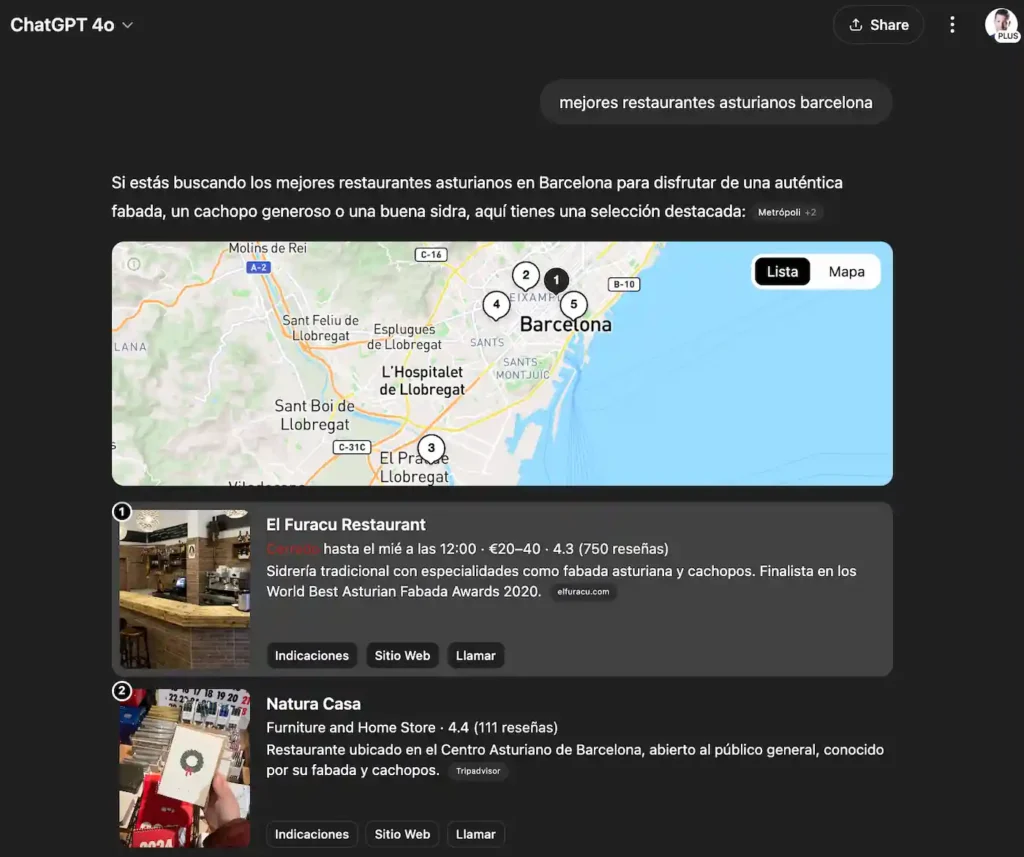
So the goal of this analysis is to measure how much and how Foursquare influences ChatGPT's local answers, by inspecting the internal JSON the model generates when it decides to “go out and search” for answers instead of relying on its memory.
Methodology
To do this, I analyzed the JSON responses for 50 prompts about restaurants, locksmiths and florists in five Spanish cities: Málaga, Barcelona, Valencia, Teruel and Mérida (the last two are small cities).
I picked different locations because Foursquare's coverage depends on urban density, which is pretty obvious. One study cross-referenced Foursquare venue counts with population census data and found an almost linear correlation between population density and POI density. The more inhabitants per km², the more places registered in the API. In other words, even though Foursquare boasts 100M points of interest worldwide, they aren't evenly distributed. For example, megacities in the US or EU have thousands of listings, while small towns are full of “gaps” (missing venues or venues with incomplete data).
TLDR
If you don't want to read the whole post, here's the takeaway: between 60% and 70% of the businesses ChatGPT shows first come from Foursquare… and they also tend to be the majority in the results block. In other words, being on Foursquare is a priority if you want to do local SEO in ChatGPT, especially in small towns or for niche businesses. And yes, I'm calling it SEO, because this isn't GEO, or LLMO, or GAIO, or LSO, or LEO. It's simply about improving your visibility wherever your users are.
As a side note, Yago Vázquez has also been analyzing this data, and here's his post, which complements this one.
1. Orchestration flow and search trigger
| What happens |
Technical detail |
| 1. User prompt |
Arrives as a role:“user” node in the mapping tree. |
| 2. SONIC scores the query |
The orchestrator runs SONIC on the text. If search_prob ≥ 0.54, the request is flagged as “requires search”. |
| 3. Call to web.search |
GPT‑4o generates a role:“assistant” → recipient: “web” message whose only content is search(“original query”).
The query is “normalized” (query fan-out) before the call |
| 4. web.search response |
Another hidden node (role:“tool”) arrives with a single JSON that includes several sections: businesses_map + business_fallbacks, image_results, search_result_groups / grouped_webpages, safe_urls, blocked_urls, moderation_results... |
| 5. Visible final answer |
GPT‑4o takes the JSON and builds the message for the user. It inserts the structured blocks above.
All the blocks cite the same search with IDs like turn0search0, turn0search1…, so everything can be traced back to the original SERP.
Free text is added before/after those blocks. |
| 6. Model locked against other slugs |
Since the conversation already uses the tool, the JSON includes model_switcher_deny to stop future “regenerate” actions from switching to models that don't support tools (o1, o1‑mini...). |
Observations
Here's an example of ChatGPT's query classifier, called "SONIC", which it uses to trigger the search tool. In this case, for the query "mejores restaurantes asturianos barcelona" (best Asturian restaurants in Barcelona), it came close to answering from memory instead of using the search tool, because the probability was 0.59, only slightly above the 0.54 threshold.
"status": "finished_successfully",
"end_turn": null,
"weight": 1.0,
"metadata": {
    "sonic_classification_result": {
        "latency_ms": 0.021952670067548752,
        "search_prob": 0.5875909485626426,
        "force_search_threshold": 0.54,
        "classifier_config_name": "sonic_force_pg_switcher_renderer_config"
    }
}
The orchestration forces tool calls to run on GPT‑4o. Every message tied to web.search carries model_slug = gpt‑4o, and the JSON includes a model_switcher_deny that blocks o1, o1‑mini and other slugs for searches.
"model_switcher_deny": [
    {
        "slug": "o1",
        "context": "regenerate",
        "reason": "unsupported_tool_search",
        "is_available": true,
        "description": "This model doesn't support search."
    },
    {
        "slug": "o1",
        "context": "conversation",
        "reason": "unsupported_tool_search",
        "is_available": true,
        "description": "This model doesn't support search."
    }
]
2. Sources and providers detected
- In businesses_map
- foursquare (local listings with a hash ID): most of the entries, and almost always among the first ones shown.
- serp (scraped directly from the SERP): for businesses without a Foursquare listing.
- In image_results: Some queries trigger images with the original URL, a thumbnail and the attribution domain. Usually from Foursquare's CDN (fastly.4sqi.net) and Bing thumbnails.
- In grouped_webpages / search_result_group: Lists of snippets grouped by domain. These are organic snippets (TheFork, Yelp, TripAdvisor, the Spanish wedding directory Bodas.net...). Every URL that will be shown to the user first goes through the safe_urls whitelist.
- In business_fallbacks: these are generated on the fly from the same results the search returned, with links to Google Maps.
Observations:
ChatGPT doesn't re‑rank (not by rating, alphabetical order, opening hours…). The businesses_map array usually starts with entries whose provider is foursquare and then adds the serp ones (direct scraping). My hypothesis is that it comes down to latency, because the general SERP search takes more milliseconds. When both data streams arrive, they're concatenated in the order they're received, with no reordering or merging. It's true that the array arrives “as is”. But in some tests (~10%) I see Foursquare return >20 venues and the model cut them down to the first 10 before rendering them. Technically, that's a “hard cut” rather than a reordering.
That's why Foursquare items almost always show up first in the list: their source returns the documents sooner and “wins” that latency race. It doesn't mean they have a higher relevance score, just that they come first in time when the pipeline aggregates the results. Also, there's no deduplication: the same business can appear several times in the same array if it comes from different sources with inconsistent NAP. Which can come in handy for spamming.
For example, for "floristerías para bodas en Teruel" (wedding florists in Teruel), the Foursquare venue_id appears twice with different descriptions (GPT filled in 2 texts using different sources):
{
  "id": "9b66c20692eb9d5e6394fa75",
  "name": "Floristería",
  "description": "Con una calificación de 5.0, esta floristería se especializa…"
},
{
  "id": "9b66c20692eb9d5e6394fa75",
  "name": "Floristería",
  "description": "Fundada en 2001, cuenta con una valoración de 5.0 y ofrece…"
}
And then there's the fallback case: a Foursquare listing inside businesses_map and, a few milliseconds later, the fallback generated from the Bodas.net organic result.
/* businesses_map (provider = foursquare) */
{
  "id": "9b66c20692eb9d5e6394fa75",
  "provider": "foursquare",
  "name": "Floristería",                    // generic name
  "address": "Avenida de Aragón, 12, 44002 Teruel Aragón",
  "latitude": 40.3330899,
  "longitude": -1.1038829
  ...
}

/* business_fallbacks (plan B) */
{
  "name": "Floristería Ideas",             // same shop → different name
  "location": "Teruel",
  "url": "https://www.google.com/maps/search/Florister%C3%ADa+Ideas%2C+Teruel",
  "cite": "turn0search0"
}
From what I can see, business_fallbacks are plan B. Each entry has a cite field ( e.g. cite:turn0search9 ) that points to one of the internal IDs the tool assigns to the SERP results. In the same object, we can see how that ID resolves in cite_map to the original title and URL of the organic result. From that title, the assistant builds a “Google Maps search” link: https://www.google.com/maps/search/<business_name>,<city>,<country> (example: “Cerrajero Málaga ‑ Profesionales Málaga” → link to Google Maps). In other words, it's a search URL, not a listing with a Place ID.
The render_fallbacks property decides whether the front end shows them. In most prompts it comes back false:
"business_fallbacks": [
    {
        "name": "Cerrajeros Málaga",
        "location": "Málaga, España",
        "description": "Ofrecen servicios de cerrajería 24 horas con precios desde 39€. Realizan aperturas de puertas, cambios de cerraduras y más.",
        "cite": "turn0search0",
        "url": "https://www.google.com/maps/search/Cerrajeros+M%C3%A1laga%2C+M%C3%A1laga%2C+Espa%C3%B1a"
    },
    {
        "name": "Cerrajeros Málaga 24h",
        "location": "Málaga, España",
        "description": "Servicio urgente con desplazamiento gratuito en un máximo de 25 minutos. Precios desde 39€ y más de 15 años de experiencia.",
        "cite": "turn0search1",
        "url": "https://www.google.com/maps/search/Cerrajeros+M%C3%A1laga+24h%2C+M%C3%A1laga%2C+Espa%C3%B1a"
    },
    {
        "name": "Cerrajeros Málaga Baratos",
        "location": "Málaga, España",
        "description": "Empresa con más de 30 años de experiencia. Ofrecen servicios de cerrajería económica, incluyendo aperturas y cambios de cerraduras.",
        "cite": "turn0search4",
        "url": "https://www.google.com/maps/search/Cerrajeros+M%C3%A1laga+Baratos%2C+M%C3%A1laga%2C+Espa%C3%B1a"
    },
    {
        "name": "Soluciones González",
        "location": "Málaga, España",
        "description": "Cerrajeros disponibles 24 horas todos los días del año. Llegan en 20 minutos y ofrecen precios competitivos.",
        "cite": "turn0search5",
        "url": "https://www.google.com/maps/search/Soluciones+Gonz%C3%A1lez%2C+M%C3%A1laga%2C+Espa%C3%B1a"
    },
    {
        "name": "Cerrajeros Málaga AC",
        "location": "Málaga, España",
        "description": "Brindan servicios de cerrajería las 24 horas, incluyendo apertura de puertas, cambio de cerraduras y más.",
        "cite": "turn0search10",
        "url": "https://www.google.com/maps/search/Cerrajeros+M%C3%A1laga+AC%2C+M%C3%A1laga%2C+Espa%C3%B1a"
    },
    {
        "name": "Cerrajeros Málaga",
        "location": "Málaga, España",
        "description": "Realizan aperturas de puertas desde 30€ y ofrecen instalación de cerraduras de seguridad.",
        "cite": "turn0search11",
        "url": "https://www.google.com/maps/search/Cerrajeros+M%C3%A1laga%2C+M%C3%A1laga%2C+Espa%C3%B1a"
    }
],
"render_fallbacks": false
I also see a two-layer safety check before any link, image or external source is shown to the user:
- moderation_results + blocked_urls: This first layer acts as an exclusion filter. It evaluates all the content returned by the web.search tool before it reaches the model.
- moderation_results would flag Trust & Safety risks (like violence, sexual content...).
- blocked_urls is a dynamic blacklist that removes domains considered dangerous or not allowed (for example, due to copyright infringement, malware, spam...).
- safe_urls: The second layer works as a whitelist. Only the URLs explicitly included in this approved list get rendered in the final interface (with thumbnails or clickable links). If a URL isn't in safe_urls, the content can be shown as plain text, but with no image or visual enrichment.
3. Local SEO recommendations for ChatGPT
Now that we've looked at the orchestration flow, the sources involved and how the results are presented in the interface, let's see what practical tips we can take from all this to optimize a business's local visibility inside ChatGPT.
- Having a Foursquare listing is priority number 1 for local SEO in ChatGPT. Most of the businesses shown come from Foursquare, and they tend to be the first ones to appear. Keep your listing complete (rating, hours, photos): it makes the businesses_map block richer and increases your chances of appearing at the top.
- Complete structured data: Empty fields show up blank in the ChatGPT UI. Fill in opening hours, price range and categories to stand out from your competitors. The is_open flag lets the UI show whether the business is open “now”. Keeping your hours accurate can influence the user's decision.
- Consistent NAP and IDs: GPT doesn't deduplicate. If you use variations of your name/URL, you run the "risk of cannibalizing" your own business, which might be a good thing if you're up to no good.
- Optimize for the whitelist: Make sure your domain appears in the organic results that make it into the whitelist (safe_urls). Sites outside that whitelist won't be shown. Get PR coverage on those sites and get listed in those directories.
- Add optimized images: GPT serves thumbnails straight from the SERP in 4:3. So images in that aspect ratio, or close to square, would minimize how much gets cropped. It's also a good idea to leave some breathing room around the main subject, since the crop is always centered. That way, text or logos won't get cut off.
- Build a classifier with SONIC's probability for better keyword research: Since the system goes to the web when search_prob > 0.54, you can train your own classifier (a simple regression or tree model) using prompts labeled with their search_prob to predict whether a query will trigger a search. That way, you'll spot in advance the “local‑dependent” queries where you want to rank. Or simply queries that don't rely on the LLM's memory.
- Bulk audit of blocked_urls: export those arrays across many prompts to find commonly banned domains and avoid having your business listed on them.
Related:
It's Not GEO or AEO, It's Just SEO: How to Do SEO for AI
What the ChatGPT Leaks Teach Us About SEO for AI