In this post I'll show you how to do SEO for product pages and drive more traffic to the highest-converting pages of your e-commerce site, and we'll also bust a few SEO myths about them.
How to build a product page that wins over your users and, as a result, Google
If we want a product page to rank well on Google, it has to be useful. To get there, a product page has to address the concerns, uncertainties and doubts users have when buying, which can all be summed up in one: the fear of getting it wrong.
That's why it's important to describe a product fully. This way, users are more likely to buy the right item and feel more confident when making a decision (without worrying about having to return it).
In terms of usability heuristics, well-designed product pages should have the following features:
Descriptive product name
Product description
Recognizable product images
Product images showing the product in use
Option to enlarge the images
Price, including any variation that could change it (color, shipping, financing...)
Availability
Returns and shipping terms
A clear way to add to cart
Option to go up a level with breadcrumbs
Ideally, product pages should also offer:
Customer reviews (sorted by helpfulness) and/or expert reviews and/or ratings.
Additional product images (video, close-ups...)
Clear product options to make choosing easier (color, size...)
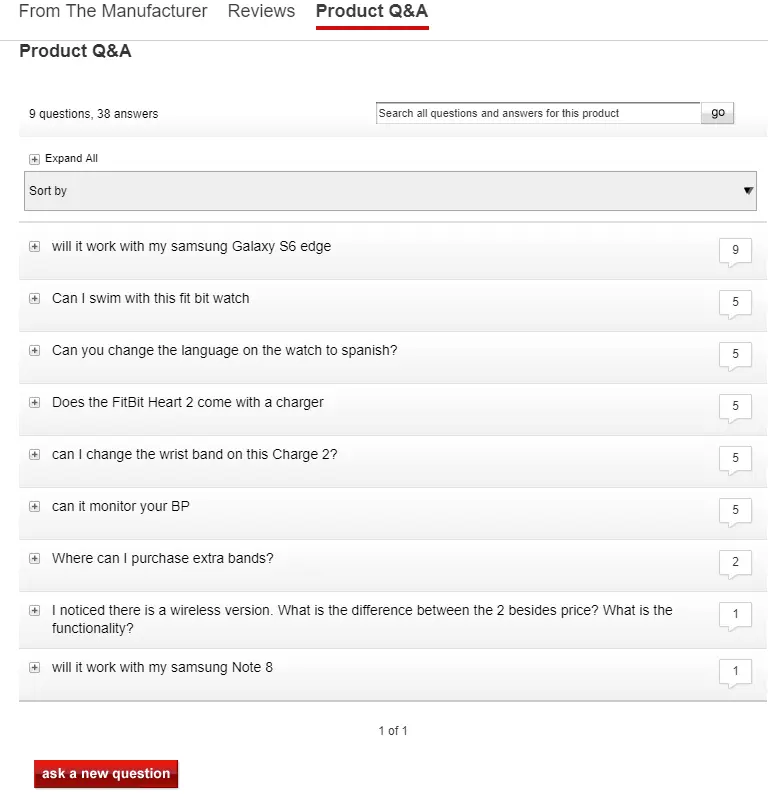
Q&A (sorted by helpfulness)
Related products, shown above the fold when the item is out of stock
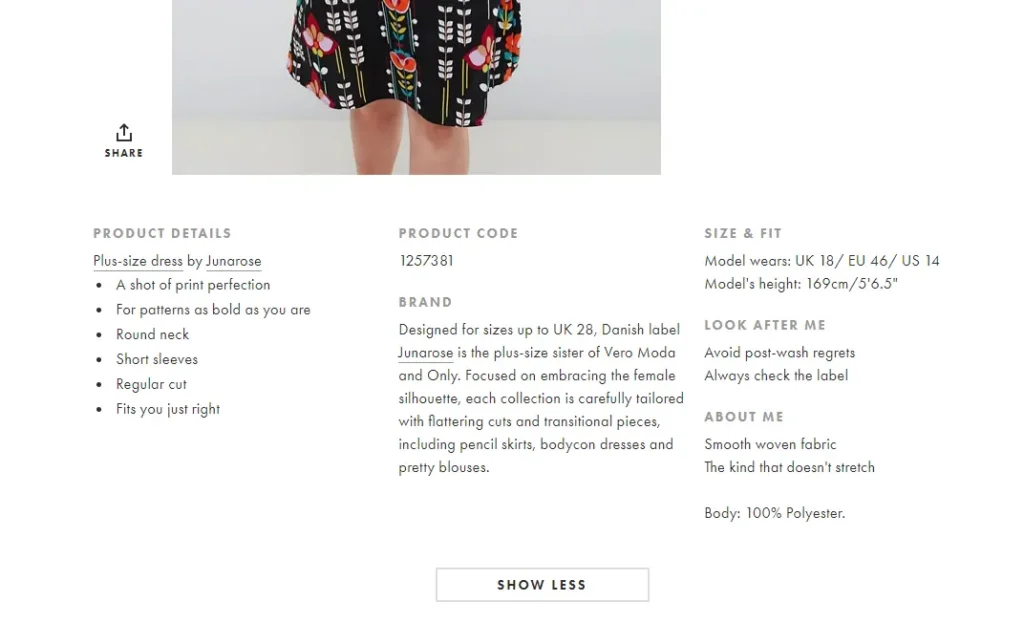
Size the model is wearing (fashion)
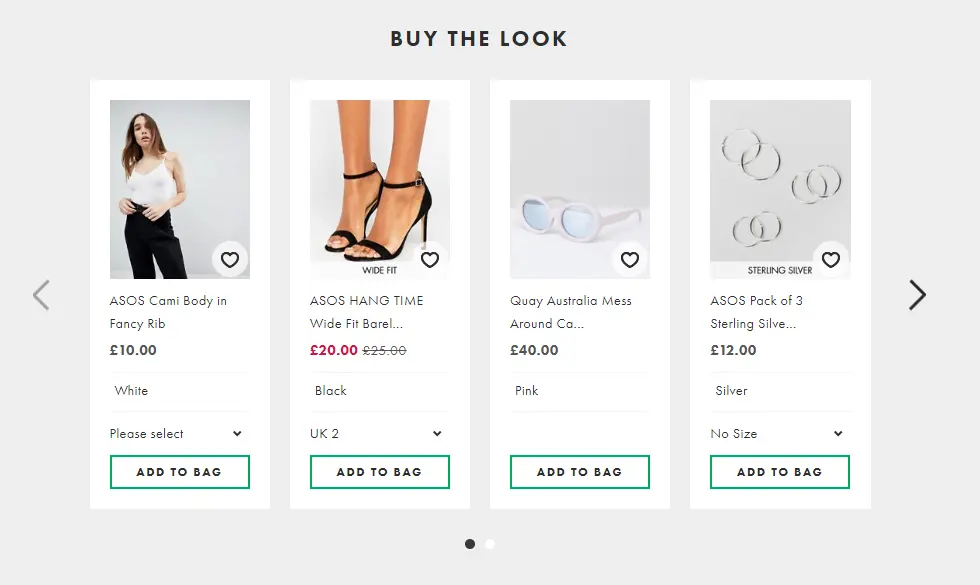
Complete the look / Frequently bought together
ASOS: Buy the look on a product page
Product descriptions need to be complete, but that doesn't mean they have to be long just for the sake of it. In fashion e-commerce, for example, the questions users want answered are: how and when the item can be worn, the material, washing instructions, details and how it's made, the model's measurements and the size they're wearing in the photo, whether it's lined, whether it's waterproof, how warm it is…
ASOS: Model sizes on a product page
To find out the most common questions people have when choosing each product, I always recommend going through the emails customers send with their questions. In e-commerce, Q&A sections on product pages are also very useful for this. And if you're lucky enough to have physical stores, the best thing you can do is talk to the store managers to find out what customers usually ask when choosing each product.
MACY’S: Q&A on a product page
E-commerce sites with quick, concise descriptions usually convert better. But that's not true for every type of product, especially when we're talking about complex or expensive products, or products with long decision processes.
When the decision process is long, there are ways to encourage other users to buy from you. Macy’s and David’s Bridal do this really well by encouraging users to upload a photo of themselves using the product:
David’s Bridal: share your look on a product page
In these cases, product pages that start with a summary also work well: they highlight the specs that set the product apart (especially the benefits) and then add more detail or specs further down the page. In other words, you need to create different layers of information so users can read as much as they need to make an informed decision.
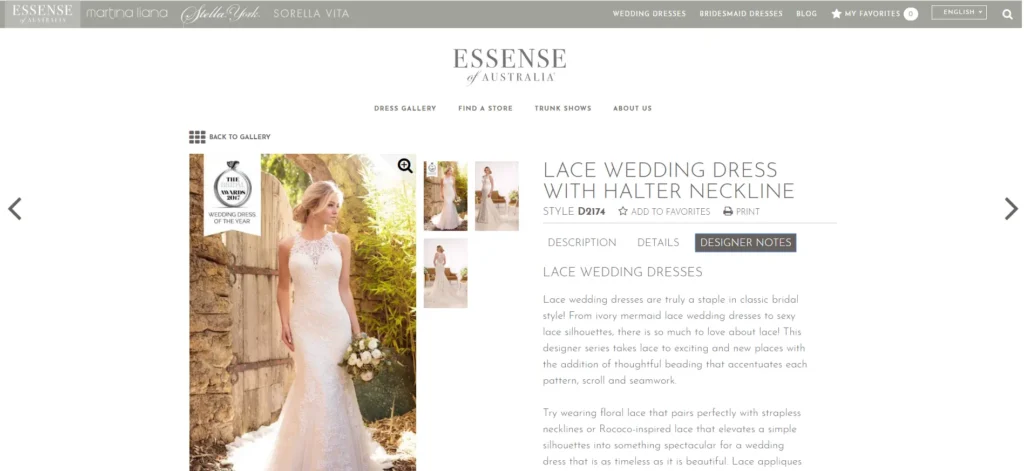
For example, on Essense Designs you can see how the product page offers a full description plus 2 extra layers of information: the fabric details and, something I think is a great call for this type of product, the designer's notes.
ESSENSE DESIGNS: Product page with description, details and designer's notes
SEO best practices for product pages
Now that we've seen how to win users over so they stay on product pages and convert (which will indirectly help SEO), let's look at 7 things we can do to help Google understand us.
1. Don't hide the product description
If you hide the description, Google will most likely give that content less weight, as Google has confirmed and as I've seen for myself on several sites.
2. Don't forget the alt text
This is a must for Google Images search and for making your product pages more relevant. If you have a separate mobile version, don't forget these elements there either, especially now that mobile-first indexing is on its way.
3. Avoid boilerplate content
If your product pages have little content, try to keep Google from seeing other content that dilutes their relevance. For example, the typical shipping, returns and sizing text that's repeated on every product page of the site. Ideally, this content wouldn't be in the page's DOM at all and would only load “on click”.
4. Schema metadata
Schema.org metadata is great for disambiguating similar products and for improving your click-through rate in the SERP (rich snippets). Google recommends that, besides marking up the product name and brand, you use another property such as the SKU to tell similar products apart.
If you have a separate mobile version, don't forget to mark it up too.
5. Keep an eye on rendering
With new JS frameworks (Angular, React…) and PWAs popping up, it's important that Google can render every element of the product page without problems.
It's very common to see mistakes here in how images and descriptions load. But where I've seen the most rendering problems is in the interlinking modules (cross-selling, upselling and links to the next/previous product).
6. Product variations
This isn't a big problem, and Google handles it very well. Still, if the variations make the content of the pages identical and there's no point in keeping both in the index, it's best to consolidate them with a canonical.
Sometimes the pages are similar but target different intents with traffic potential (as can happen with color or model). In that case, it may be better not to consolidate them (confirmed by Google). There's nothing wrong with having both versions indexed; just try to differentiate them a bit so Google can show the right one when someone searches.
7. Out-of-stock products
Here we need to distinguish between a few different cases:
7.1 Permanently out-of-stock products
Ideally, redirect the product to the most similar URL possible, for example the newer model. Sometimes this is hard to maintain, so in that case, try redirecting to the parent category and check in Search Console that it doesn't end up as a soft 404.
If it does end up as a soft 404 and the product doesn't bring in traffic or links, then returning a 404 or 410 is fine. It's normal for this to happen, and it's not a bad thing.
One thing to keep in mind so Google doesn't waste time on these pages: make sure no internal links point to the product, and that it's not in the sitemap either. If after a few months Google is still crawling these URLs, it may consider the page important, and we should find a way to redirect it to a relevant alternative.
Sometimes these are products that bring in a lot of traffic and links. In that case, try to keep the page live with a 200 and show related products above the fold.
7.2 Temporarily out-of-stock products
The best solution is to not return a 404 and to mark them with the schema availability value “out of stock”. In this situation, it's a good idea to include a “notify me when it's back in stock” option.
7.3 Products that change category
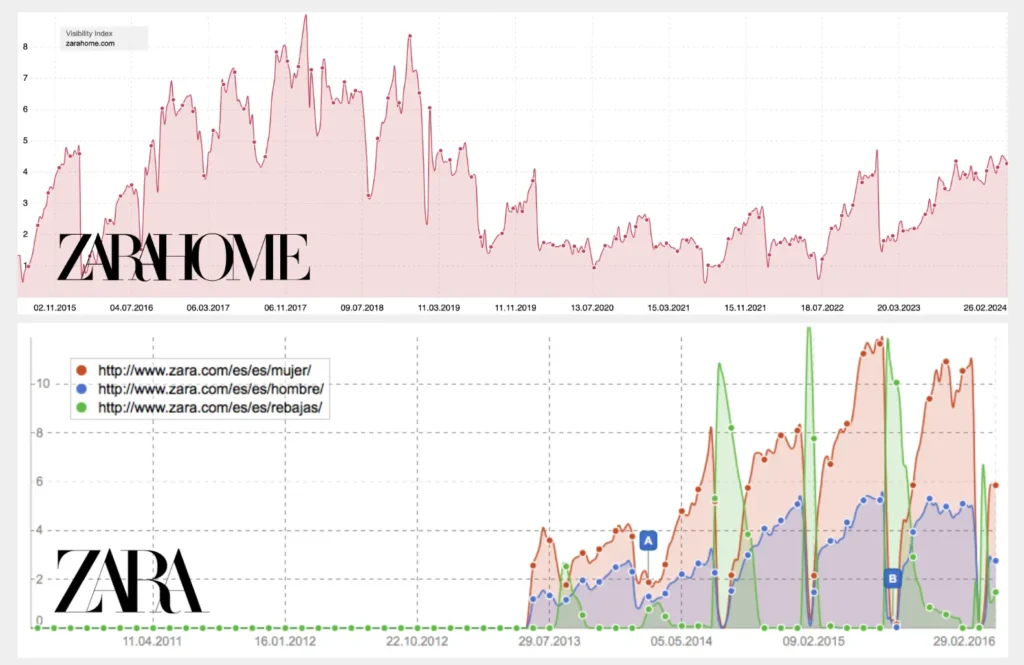
This is very common during sales. The structure of the product URL often changes, so the product has to be redirected, and that causes serious ranking problems, as you can see in the image below. In these cases, it's best to keep the product URL as it is, even if the product now belongs to the “/sale/” category.
ZARA and ZARA HOME: Every sales season, they change all their catalog URLs and redirect them to the sale directory.
Product page myths
Now that we've learned how to win over both users and Google, it's time to bust a couple of SEO myths about product pages.
Does Google penalize you for putting part of your product page content on category pages?
Category pages usually rank better than product pages, and that happens because listing pages use text that also appears on the product pages. With this kind of similar content, Google usually shows the strongest page in the architecture (the one with the most links), and that's almost always the category. Google has confirmed this, and it will never filter or penalize you for it.
If that's not why your product pages rank lower, it could be that the information architecture for your product pages is poorly built and they don't get all the internal link equity they should. Sometimes it's because they end up as orphan pages in the architecture.
Another reason, and one we have less control over, is search intent. For a query that may look specific to us (e.g. "astralpool electric pool cleaner"), users prefer to land on a page with a range of products and filters rather than on a single product page. That's why Google sometimes ranks listings above product pages: it has learned that, for certain queries, the category is a more satisfying result than a product page.
Does Google penalize you for having the same product page content as your competitors?
This is one of the biggest myths in e-commerce SEO. Google will not penalize you in any way for using the manufacturer's content on a product page, basically because you're not doing anything illegal and there's no algorithm that filters this. If your site is a scraper, that's another story.
All that will happen is that Google will try to show the original source of that description, and the other results will rank below it. Sometimes it may even rank a site that doesn't have the original content above the original, because that site is the most relevant for the user at that moment (or has more authority). Google has confirmed this too:
“If we recognize that someone is searching for something maybe more geared towards eBay, then maybe we’ll show the eBay version. If someone is searching for something that maybe they can pick up in a physical store nearby, then maybe it’ll show your version.”
John Mueller
On the other hand, Google also says:
"you are not going to solve it [i.e. ranking higher than your e-commerce competitors for a product] by rewriting your descriptions." "That is another thing that people need to understand"
John Mueller
This makes it clear that it's not about rewriting for the sake of rewriting. In the end, it's about making things useful, like we saw earlier.
For example, on regalador.com (a Spanish online gift store), the product page copy is written by journalists who have tested the product first. So the pages offer information that doesn't exist anywhere else on the web, which adds value in itself and helps conversion.
The goal of this article is to help you understand and spot the link building problems a website may have. This tutorial is a working guide that explains how to do an inbound link analysis with SISTRIX, using edreams.es as an example. It's a simple backlink audit of what you can see from the outside, […]
There's always been a debate about whether investing in Google Ads affects SEO. But when we say it affects SEO, what do we actually mean? Organic traffic, or what the SERP looks like? And if it affects the SERP, is it a ranking factor? I've already made my opinion clear in plenty of places: Google […]