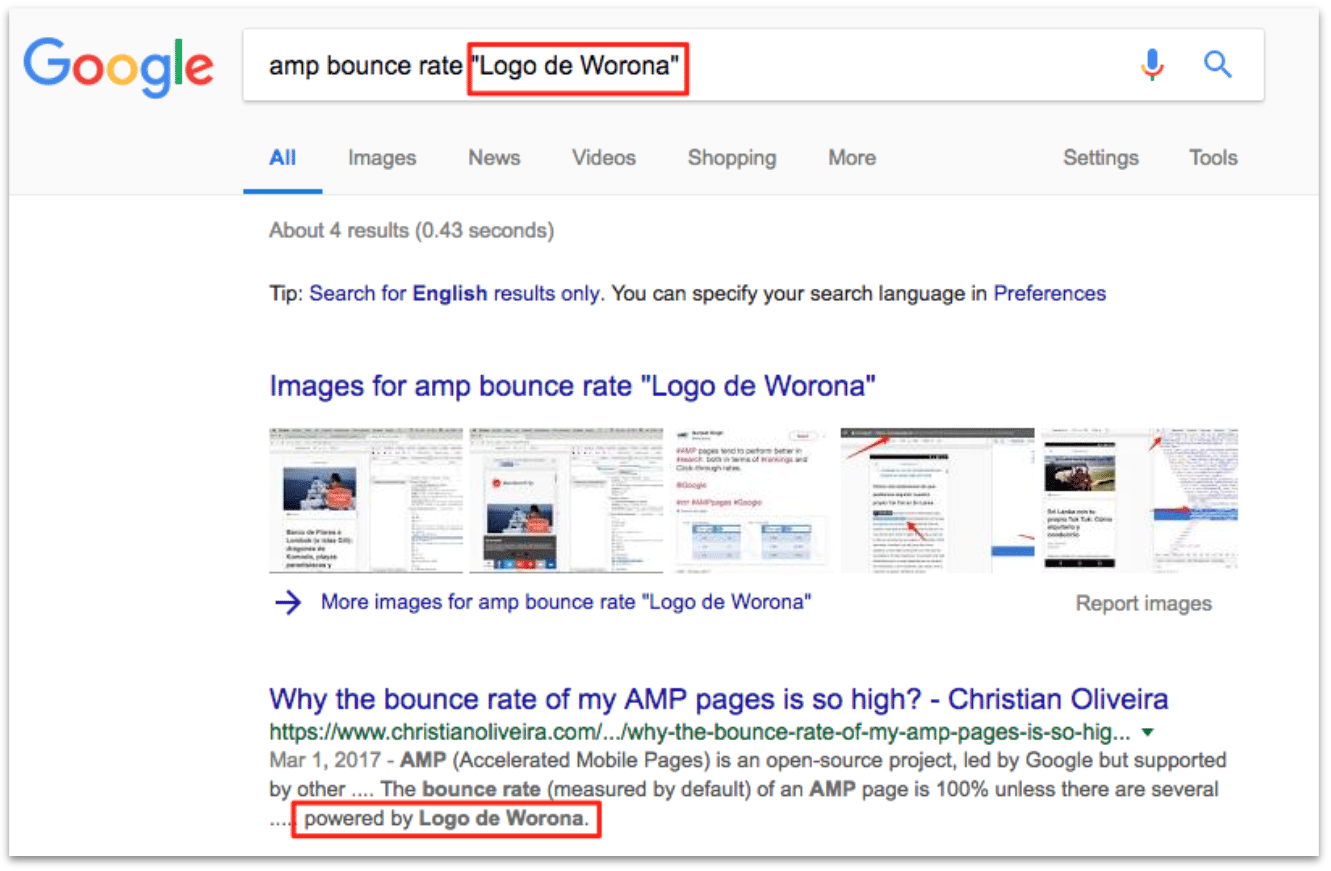
In this article, Christian Oliveira and I summarize the talk we gave at Congreso Web, a Spanish web conference (get the slides here). In it, we set out to explain this technology (PWA) and how SEOs and developers need to deal with it to make it accessible to search engines. It's based on our experience with clients that use JavaScript frameworks and libraries like Angular or React, on JS sites belonging to people we know who let us analyze their cases, and on experiments we ran to see how search engines handle them.
Today there are several solutions for meeting the needs of mobile users. For example, if elmundo.es (a major Spanish newspaper) wants to give a good experience to everyone who reads its news, it has to make sure it can serve every page properly across different ecosystems: mobile and desktop versions (with Dynamic Serving), an app (for offline browsing, push notifications and smoother navigation), AMP (since it's required to appear in the carousel) and Facebook Instant Articles (Facebook's version of AMP).
As you can see, that's a lot of ecosystems to maintain on top of the website, and that's expensive and hard to scale for any business. When it comes to native apps, they cause the biggest headaches of all, in every respect:
App developers are scarce, and startups “poach” them from each other by offering very juicy salaries. Here in Barcelona, if you want to hire an app developer, chances are they're also in the hiring process at local startups like Wallapop, Glovo or CornerJob, and you might not be able to compete with that (true story).
Another kind of solution available today for complex, more interaction-heavy needs on mobile is mobile web apps (on an m. subdomain, for example). These have a number of drawbacks:
They don't allow offline browsing.
They can't be indexed in app stores.
It's hard to do Responsive Web Design (RWD).
It's another technology you have to develop and maintain for different browser and operating system versions.
Luckily, there's now a new development approach proposed by Google that has the best of all worlds: Progressive Web Apps (PWA).
What Is a Progressive Web App
A PWA is a web page that works for every user and every device, while keeping the smooth experience of an app. This is a big advantage for sites with complex interactions. For example, if you go to Twitter or Instagram from your phone, you're actually using a PWA, not their regular website. It no longer makes sense to have these apps installed, eating up resources and data in the background: you can add the page to your phone's home screen and you'll have a fully functional Twitter or Instagram. What's more, it seems Twitter is thinking about dropping development of its app, and so is Starbucks. I guess they'll wait until more people add it to their home screens and the numbers keep looking this good.
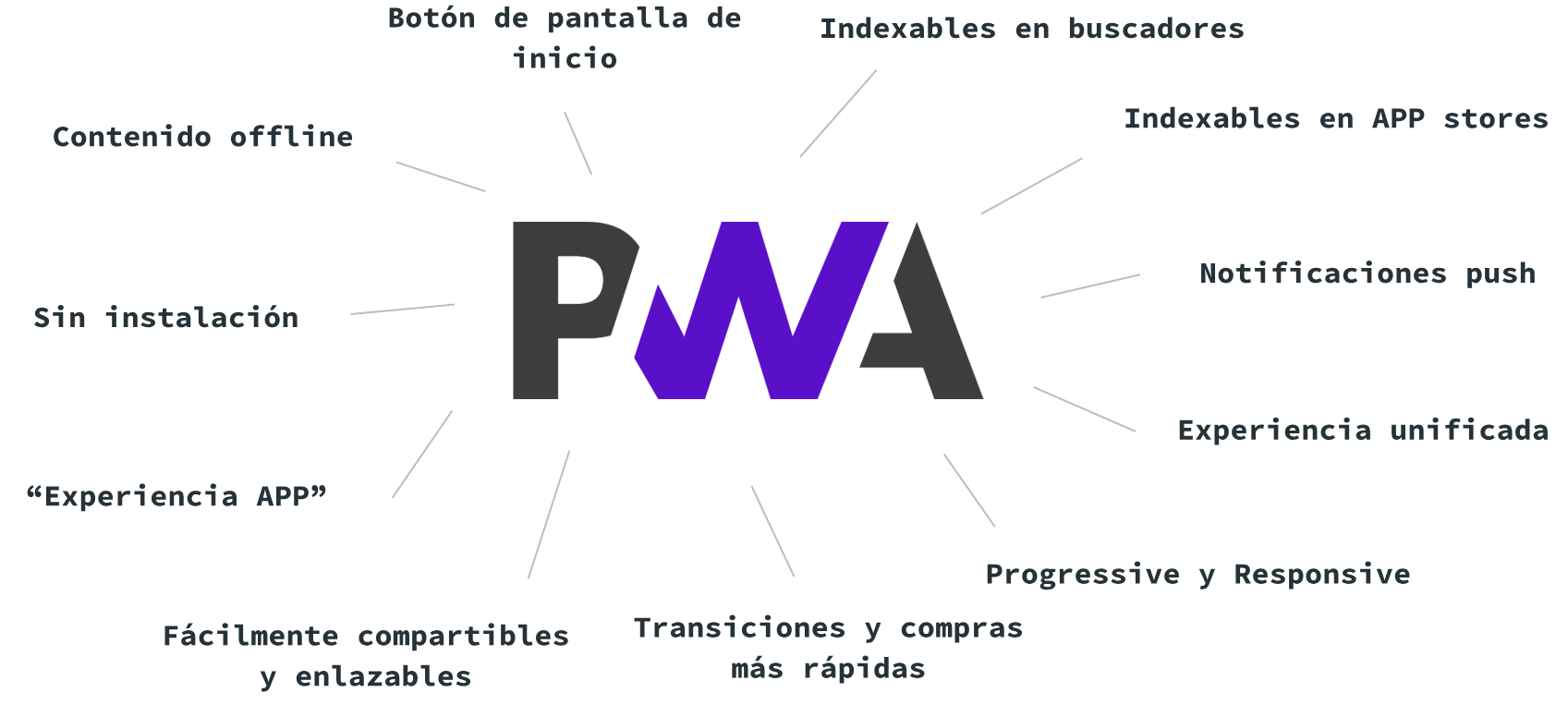
Some of the main advantages of Progressive Web Apps are:
They're apps that search engines can index (goodbye, App Indexing).
They allow one-click purchases with the Payment Request API (death to the checkout). For me, this is one of their best features, considering that on mobile there's an 80% abandonment rate for card payments. Here's a demo of how this wonder works.
They have push notifications.
They're progressive and responsive.
Easy to share and link to (because they have URLs).
Progressive Web Apps are built with JavaScript frameworks and libraries, which are becoming the standard because they make it easier to build web environments. This development approach has the following advantages:
They make developers' work easier because they integrate better with other languages. They're modular and clean, and they make it easier to reuse code. They also have a huge, very active and collaborative community.
Better performance and speed (for the server, especially with Client Side Rendering, as we'll see). For the backend, they're better on this point than PHP, Java, ASP…
Since they're open source, they're cheaper and you can find more developers. And new frameworks keep coming out that improve on their predecessors (Vue JS, for example, is much easier to learn than React JS, one of the reasons Vue is overtaking React).
They're more secure technologies thanks to the big community and the big players behind them (Google is behind Angular, and Facebook is behind React JS).
Because of these advantages, this new paradigm is here to stay, so we SEOs, and search engines too, have to adapt to it, because its growth is unstoppable.
According to Stack Overflow's annual survey of 64,000 developers, JavaScript is the top programming language, and Node JS, Angular and React JS are among the five most-used development technologies today.
How a Progressive Web App Works
A PWA is an SPA (Single Page Application) or an MPA (Multiple Page Application) with two additions that give it all its strengths: the service worker and the manifest.
The service worker is the magic behind PWAs. It's what enables background sync, offline connectivity and push notifications.
It works as a controller and sits between the browser and the network. Its job is to tell the browser cache to store files that have been accessed so that, later, the cache can send them to the client without that request having to go through the server again (that's why PWAs work offline).
The manifest is a tiny JSON file declared in the head of the HTML document. Among other things, its main job is to let the PWA be installed on the home screen so it looks like an app.
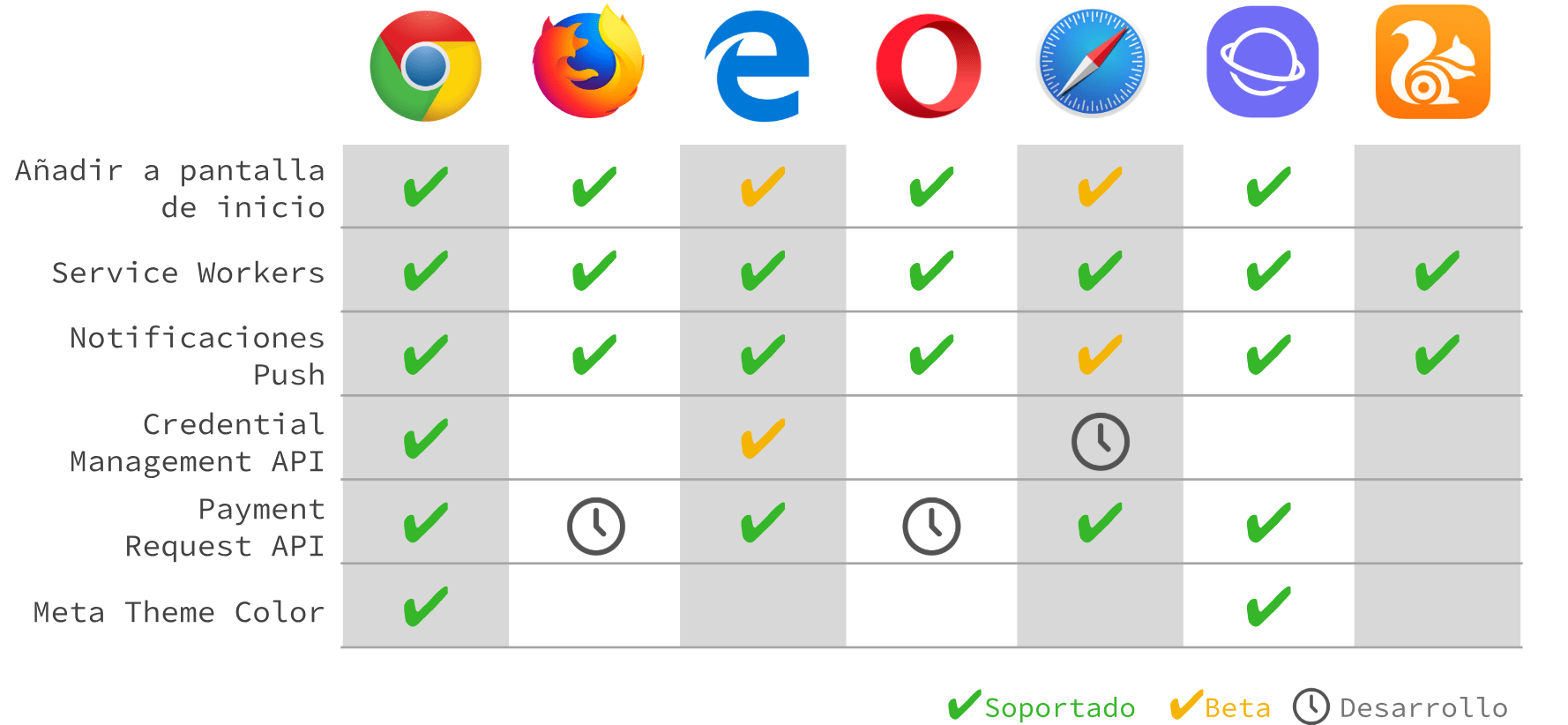
Today all browsers support PWAs, but not all browsers support every PWA feature. Luckily, this is changing fast, as you can keep checking on Can I use.
SEO and JS: How Today's Search Engines Handle JavaScript
Right now, only Google and Ask render JS decently in any framework. Baidu has announced that it does too, but based on the tests we've run, it seems much less successful for now. So if your business is in the US, Russia or China, you can't rely on Bing, Yahoo, Yandex or Baidu rendering JS, and you absolutely have to serve them prerendered content and make sure no text and/or internal link depends on JS to be displayed.
Crawling != Rendering != Indexing != Ranking
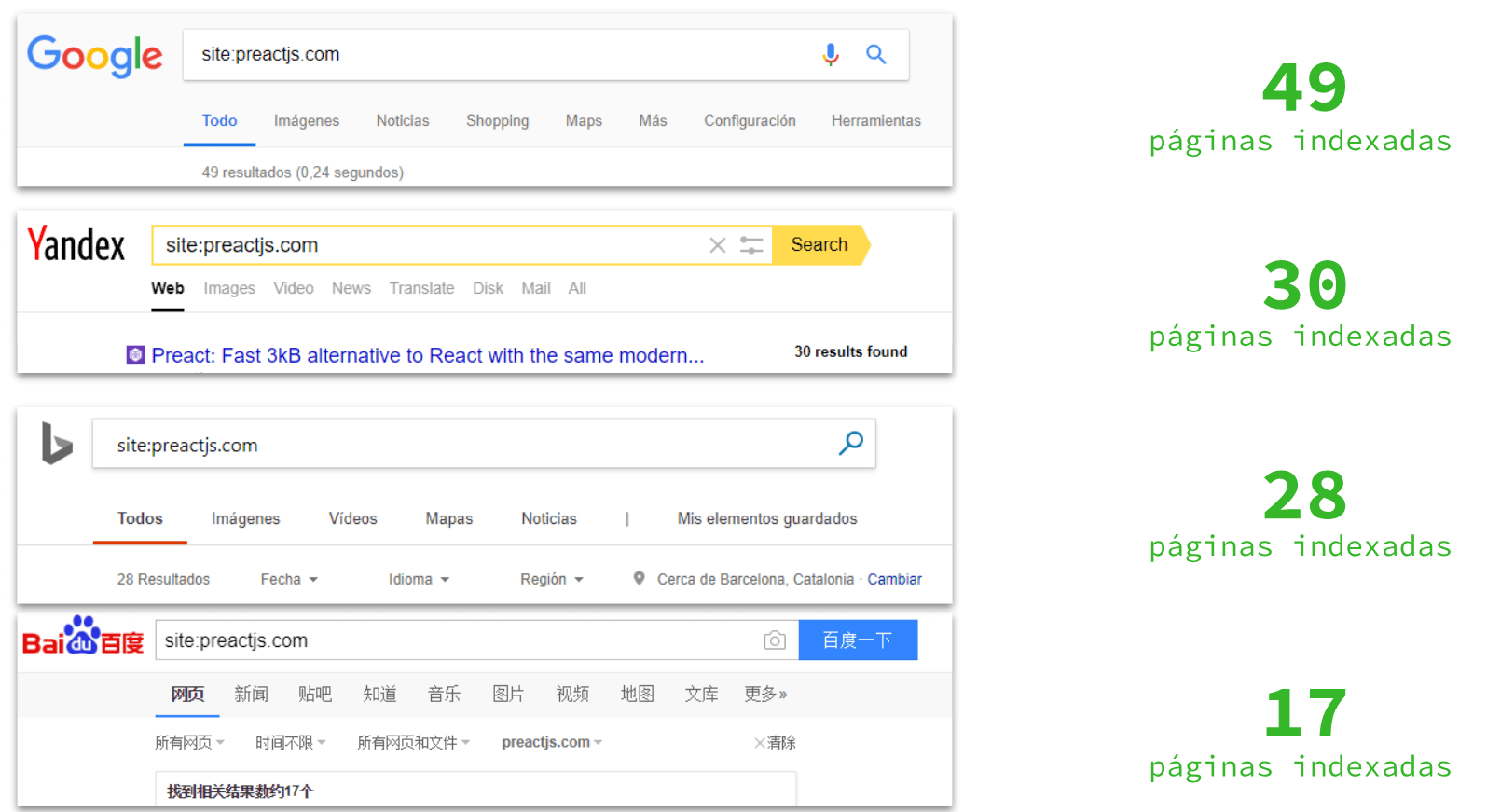
When people talk about a search engine's ability to render JS, they often run the kind of flawed test you can see in the next image. As you can see, the number of indexed pages varies across these search engines. This is done with a “site:” search on a site that depends on JS to be displayed and crawled:
A search engine having X URLs indexed doesn't prove that it discovered them by rendering them, or that it can see 100% of the content on them.
For example, if you try searching for some text strings from preactjs.com in the different search engines, you'll see that in some cases only Google and Ask have been able to see them.
Rendering a JS Site Is Expensive
So if PWAs are getting so popular and more and more sites use JS, why don't all search engines render JS? Simple: because it's very resource-intensive (and therefore expensive).
It's important to understand here that, for example, 170 KB of JS isn't the same as 170 KB of an image: even though the browser takes roughly the same time to download both files, the image is displayed super fast (in a matter of milliseconds), while the JS, besides being downloaded, has to be parsed, compiled and executed by the browser, which uses up resources and takes more time.
To give you an idea of what this can cost a crawler, here's some data that Ahrefs has shared. Every 24 hours, they:
Crawl 6 billion pages
Render 30 million pages.
Use 400 servers to do it
If you do the math, for every page they render, they crawl about 200. According to Ahrefs themselves, if they decided to crawl and render every URL in their database at this rate, they estimate they'd need between 10,000 and 15,000 servers (roughly 25 to 37 times as many), so imagine what that could cost a company in machines, electricity, maintenance…
Google Doesn't Wait Forever to Render
Because rendering JS is so expensive, another factor comes into play: Google can't wait forever for a page to finish rendering.
I found this out because I had to hide a popup and a language selector modal so that Google wouldn't consider them intrusive. What I did was load them after document ready so they wouldn't appear in the DOM, and I kept adding seconds of delay. In the end, I saw that at 5 seconds they stopped showing up in the render and in Google's cache. But if you want to be sure, it's better to load them after a user interaction; that way you make sure Google doesn't execute them.
Keep in mind this is a rough figure that can vary by website and/or over time (Spanish SEO Lino Uruñuela found it can be longer). If you want to be sure Google is able to render and see all your content, besides checking indexing, the best thing is to check it in the Mobile-Friendly Test Tool and try to get the site to render as fast as possible.
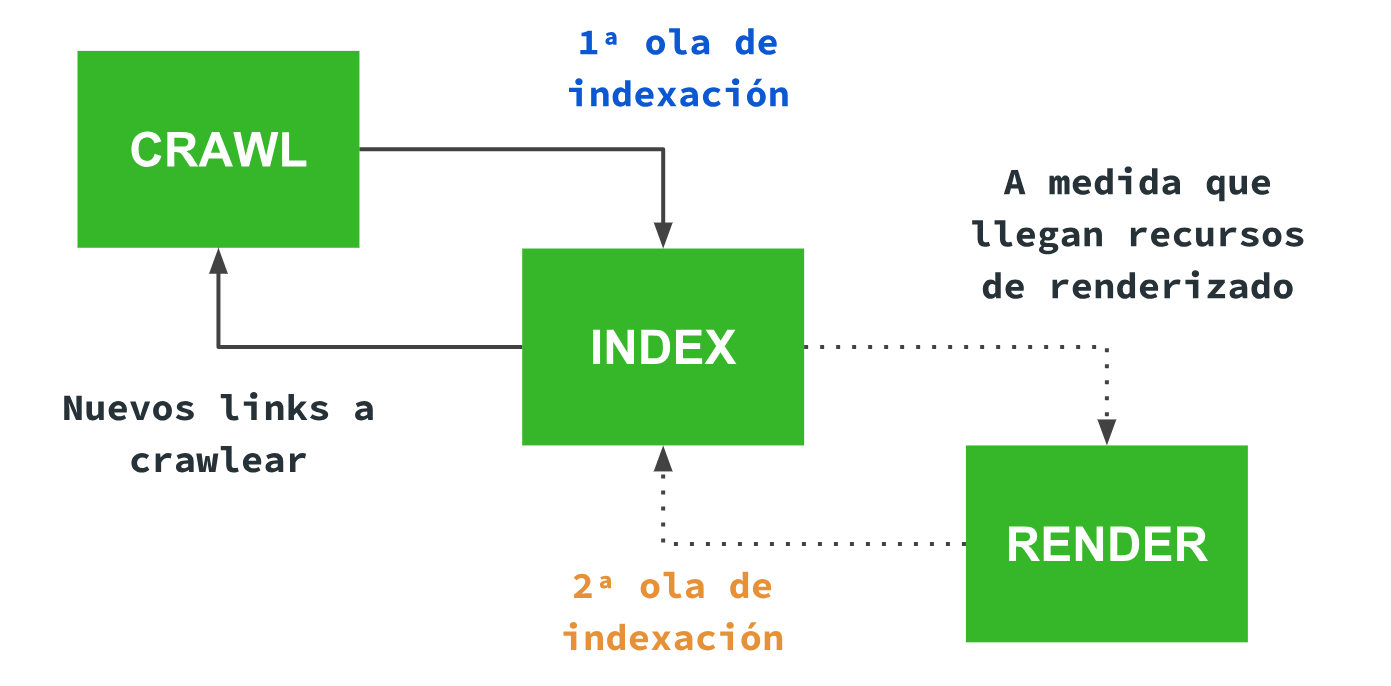
If you're IR and IE geeks like us, you'll find it interesting that before Percolator (which I already told you about here), Google used MapReduce and Google File System (which led to the birth of Hadoop). Oversimplifying a lot, before this new architecture Google worked in batches, and now it works on the fly. This means crawled pages get indexed almost immediately.
The problem comes with JS sites, because Google has to render them to see what content and links they have in order to map queries to URLs; otherwise, Google would be missing a big part of the web. As we saw earlier, this is expensive, and Google can't do it instantly because that could easily make it use up to 200 times more resources. That's why it has to index JS sites in two phases.
One of the things that affects us, and that we need to know, is that Google reads the canonical, rel=amphtml and HTTP status code in the initial fetch, and doesn't give them a 2nd chance in the render. I had no idea about the rel=amphtml part until John Mueller said so.
Whenever I've tested it, it hasn't worked for me, and running experiments with canonicals is really hard for several reasons:
It's a hint, not a directive.
A URL's internal and external links influence the canonical.
How similar the pages are influences the canonical. I've run several tests and seen that it starts working better from around 70-75% similarity between the pages' MC. And I get the feeling Google doesn't look at other important elements like the title in these cases, and thinking it through, it wouldn't make sense for Google to use the title. That's because it could really mess things up, given how common it is to have different content on URLs with identical titles because of CMS issues. But I can't say anything for sure.
You need patience: Eoghan waited a long time to see the effect.
And even if it does work in some cases, this tag still absolutely has to be in the raw HTML, because that's the only way to make sure Google sees it without problems (whether it chooses to follow it is another story).
On the other hand, if the noindex, hreflang and rel=next/prev aren't in the raw HTML, Google will read them in the rendered version (it gives them a second chance). I was able to test the noindex and hreflang part a while ago, but it didn't occur to me to check the rel=next/prev tags until Robin Rozhon mentioned it on Twitter. And the noindex part was just recently confirmed by Google.
Same as before: it shouldn't matter to us whether Google gives them a second chance, because the delay between rendering and indexing can get very long, and for a while we'll have a bunch of documents in the index that we might not want there, which can hurt us temporarily. So as a best practice, always give Google and other bots the meta tags in the raw HTML.
Another way Google using Chrome 41 affects us is that it struggles to render sites that use features more advanced than what that Chrome version supports. If we want to use modern features, we have to transpile them into ones Chrome 41 supports.
We know Google crawls, indexes and passes PageRank to HTML links (<a href=...), as it confirmed again at Google I/O:
<a href="/este-link"> will be crawled </a>
<a href="/este-link" onclick="cambioPagina('este-link')"> will be crawled </a>
<a onclick="cambioPagina('este-link')"> *will not be crawled </a>
<span onclick="cambioPagina('este-link')"> *will not be crawled </span>
*Not being crawled doesn't mean those URLs won't get indexed if someone links to them. Most indexing errors with filter pages come from problems like this.
<a onclick="cambioPagina('/este-link')"> will be crawled </a>
<span onclick="cambioPagina('/este-link')"> will be crawled </span>
/este-link will be crawled
I think it was 7 years ago, when 404s spiked in a client's Search Console right when Google Analytics virtual pageviews were implemented. Since then, I put anything in the DOM that looks like a URL into robots.txt, but it's better to change the link in the code so it doesn't have a slash.
There are other kinds of events too: onscroll and onmouseover. Google sometimes follows onscroll events, and it doesn't follow onmouseover.
If you have pagination with onscroll, it can get indexed (only the first few pages). Another one of those things you discover by chance, and it's nice that Google confirmed it.
Rendering Solutions for JavaScript Sites
To understand the available rendering options, the easiest way is to think of PWAs as the IKEA of the internet.
Traditionally, when we (customers) want to buy a piece of furniture, we go to a specialized store (the company), choose the furniture and get it delivered ready to use.
Later, IKEA came along: the customer chooses the furniture, but instead of getting the finished product, they get a set of parts and assembly instructions, and they're the ones who have to do the physical work of putting it together to get the final product they bought. Also, sometimes we have to buy extra things to assemble the product (special screws, special tools, etc.). It's all explained in the instructions.
At some point, IKEA noticed that some customers wanted its products but didn't want to do the physical work of assembling them, so it launched a new service: you can buy the furniture and have someone from IKEA assemble it and deliver it already assembled
In this analogy, the customer is our web browser and IKEA is the server, and based on this, there are 4 possible scenarios when choosing a rendering system:
Client Side Rendering (CSR)
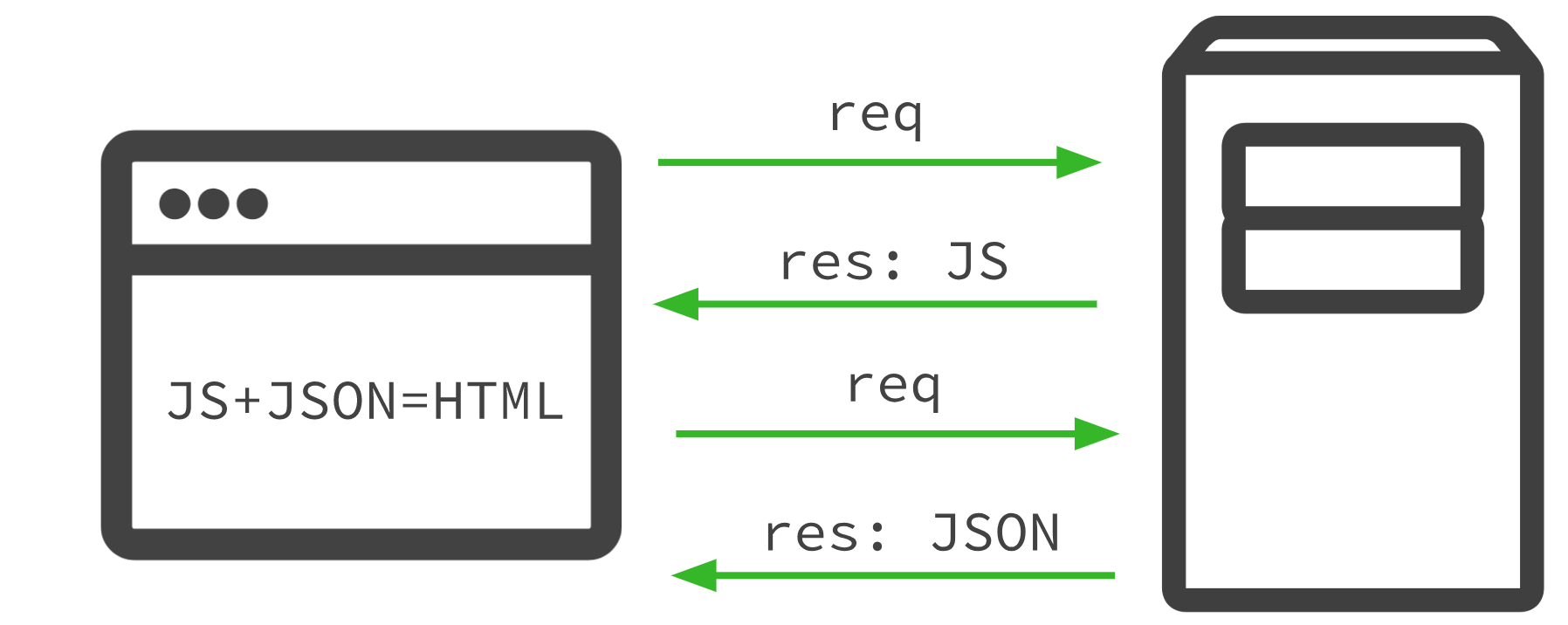
With pure Client Side Rendering, the client (web browser) gets a blank initial HTML, and it's the browser that has to “build” the final HTML from the resources and JS it gets from the server:
This is the option PWA developers originally used (and in many cases still use), and it's the one that causes the most SEO problems, since until the JS runs and the page renders, there's nothing there (no content, no links).
Server Side Rendering (SSR)
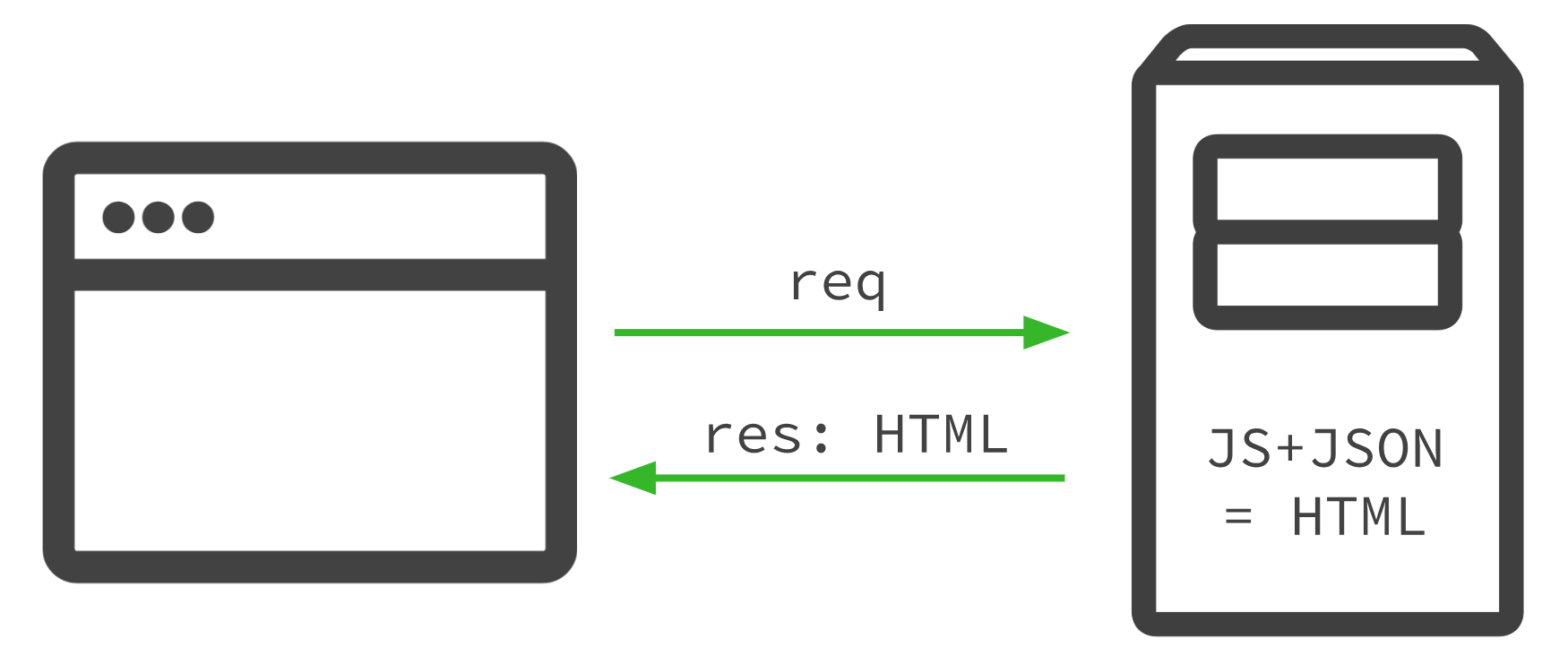
Because of CSR's SEO problems, and just like IKEA, PWA frameworks started developing a new feature so that, while keeping all those PWA features, the server would execute and render the JavaScript on its side and then send the result to the client (browser).
This way, the client (browser) gets a final HTML that works without having to execute and render the JavaScript. If the user has JavaScript enabled, JavaScript takes over and they can keep browsing/interacting with the PWA with all its features. If they don't have JavaScript enabled, it works too, just without all the advantages of a PWA.
Hybrid Rendering
The third rendering option is a combination of the previous two: part of the page is sent prerendered from the server, and another part is rendered on the client.
A very common use case for Hybrid Rendering is prerendering the parts of the page that are used across the whole PWA (a menu, for example) and letting the client render everything that changes from page to page (the page-specific content). In the following example, the “App Shell” (the top area, with the blue background) would be delivered prerendered from the server (SSR), while the bottom part (the content) doesn't appear at first and is rendered entirely on the client (CSR).
Dynamic Rendering (DR)
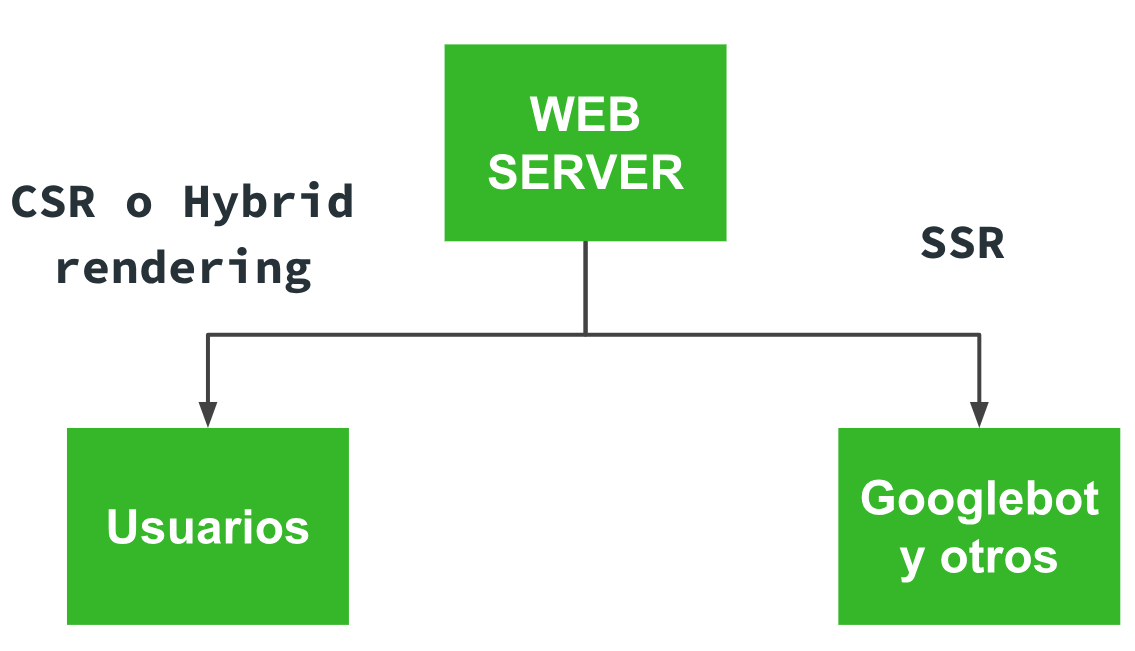
This is the option we SEOs had already been using, and Google just officially recommended it in its Google I/O talk. It basically consists of… cloaking!
Yes, you read that right. What they said is that if we have a PWA whose display depends on running and rendering JS, and we want to avoid problems, we have to make sure Googlebot (and other bots) get an SSR version, and all other user agents get whichever version we think is best (CSR or Hybrid Rendering). That way, Googlebot can see each page's content and links without having to run JS and render the page. In the end, the content Google sees will be the same as what users see once the client renders the page.
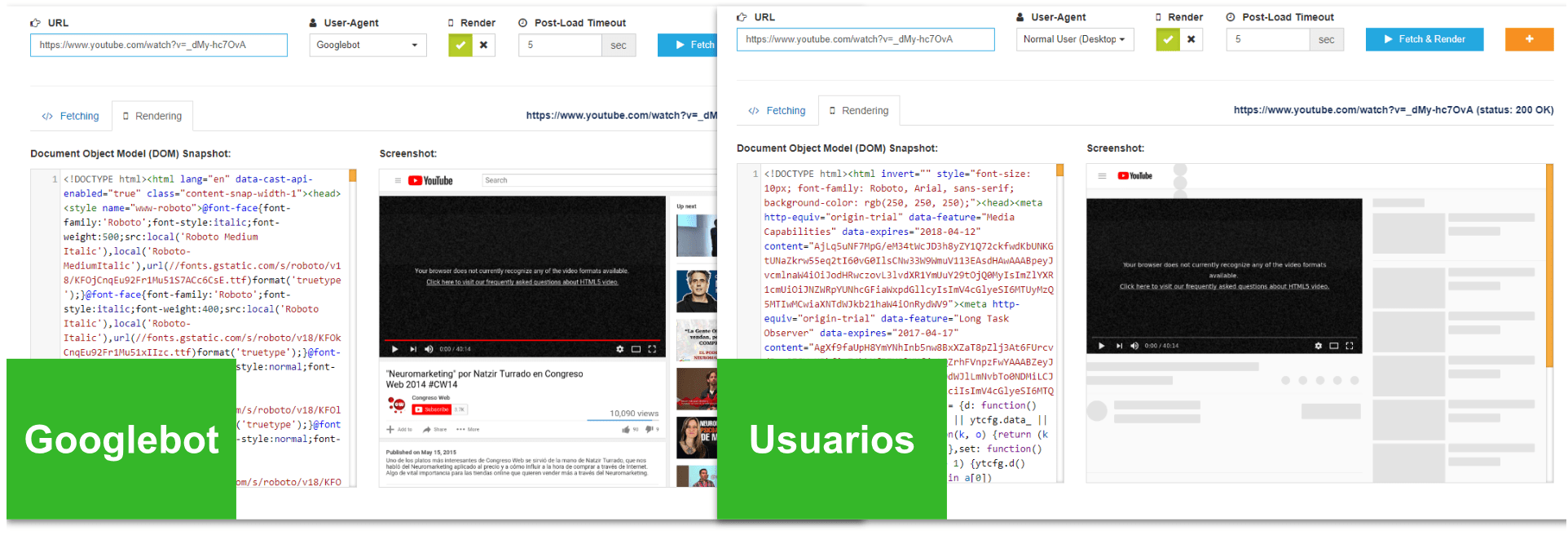
One example of a very large site doing this, and one owned by Google itself, is YouTube, and it's doing just fine. In the following screenshots (you can test it directly with this tool), you can see that when a video URL is requested by Googlebot, it gets the page with the content and links, but when it's requested by a regular user, they get incomplete HTML: a skeleton without any content or links:
SSR Is Better for Users, CSR Is Better for Sysadmins
So which strategy is better in each case? For users, at least on the first interaction, SSR is best:
Netflix, whose website is a PWA built with React and which has bet big on this technology, saw a 50% performance improvement on its landing pages (the ones it uses to acquire users) when it moved from CSR to SSR.
Why? Simple. Let's go over how these two techniques work:
With SSR, the server sends a “final” HTML, with all the content and links ready, no rendering needed.
With CSR, the server sends an empty HTML, which is then “filled in” once the browser runs the JS and renders the page.
This means that:
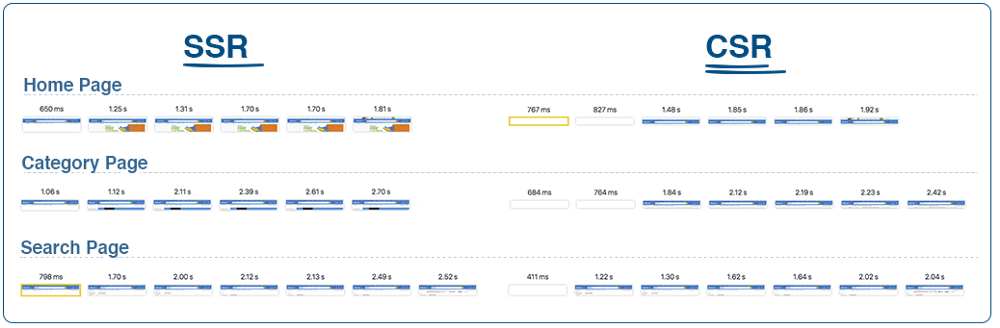
With CSR, the server responds faster (so we get a better TTFB), while with SSR the server has to use more resources to do the rendering, so it takes longer.
With SSR, the browser gets a “final” HTML that it can paint quickly, and the user starts seeing content sooner. CSR, on the other hand, depends on the power of the user's device and takes longer (much longer on slow devices) to render and display the page.
As you can see in this image from Walmart's tests, with SSR the client starts seeing content much sooner, even though the server takes a few more ms to respond:
So if CSR makes life harder for us SEOs (since we depend on the search engine's ability to run JS and render), and SSR is faster for users, why is CSR used at all? For the same reason IKEA sells furniture unassembled: cost.
The biggest winner when using CSR is the systems team (the sysadmins): by delegating the “building” of pages to the clients (browsers), the servers need much less power. If we go with SSR, we'll have to do all that prerendering work on the server, which, as we've seen, can be very expensive.
As we said earlier, the solution Google has proposed if we don't want problems is to use Dynamic Rendering (that is, SSR at least for Googlebot), but it has also specified that in some cases it now feels able to crawl and index sites built with pure CSR.
Specifically, it talked about three factors:
The size of the site (in number of URLs)
How dynamic the site is (whether you publish a lot or a little, and whether its URLs change or stay static)
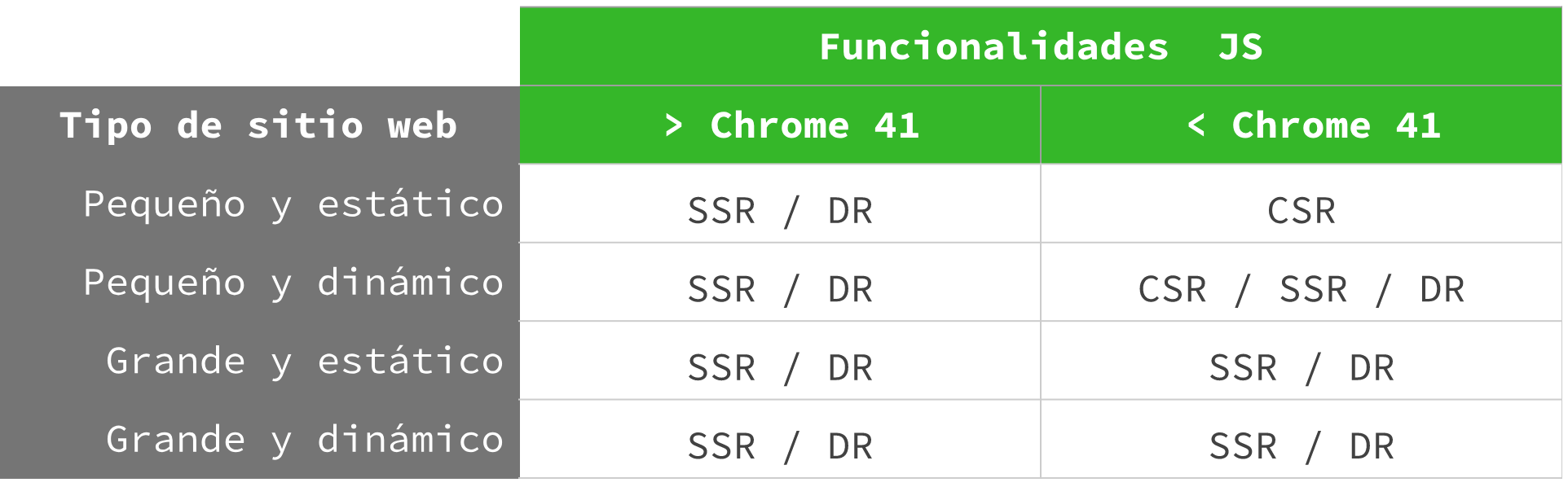
Compatibility with Chrome 41 Chrome 74
Based on that, we put together this table of what Google's recommendations would be:
As you can see, the recommendation is to always use SSR (or Dynamic Rendering), except for small, static sites. Even so, there's some risk even for those sites, so if your project depends on SEO traffic, ideally don't take chances and go with SSR / DR from the start.
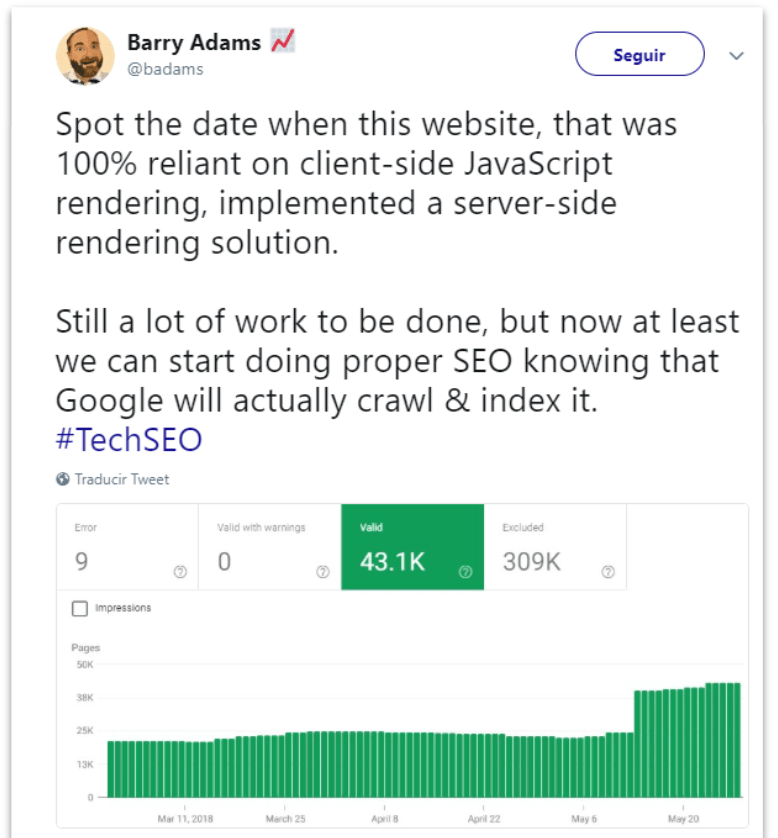
To show you the kind of problems CSR can cause, here's an example Barry Adams shared on Twitter:
It shows the trend of indexed URLs for a site that was built in pure CSR and later switched to SSR. When it did, the number of indexed pages went up substantially (it almost doubled), which shows the bottleneck JS represents for Google and why Google doesn't recommend it for large sites.
SEO Best Practices for PWAs and JavaScript
Next, we'll show you some tools to check that Google has no problems with your site.
PWA and Performance Audit
You can do it by combining the Chrome Lighthouse extension (about time they made an extension, since until then it was native in Chrome Canary) and Sonar Whal.
With the Service Worker Detector Chrome extension, you can quickly check a PWA's service worker and manifest.
Mobile-Friendly Test
Right now, Google's Mobile-Friendly Test is the best way to see the rendered page, since it's more tolerant than Search Console's Fetch & Render. In SC you often get lots of timeouts, and it's not 100% representative of reality. The Mobile-Friendly Test isn't either, but it gives you a closer idea. The problem with it is that you can't scroll.
We can also use this tool to see the HTML after rendering and check whether there are differences between the two versions of the HTML with Diff Checker. We can also analyze JavaScript errors and blocked assets.
Fetch and Render
That doesn't make it any less useful: Google's tool lets us compare what a search engine and a user would see in one go, which is very handy.
We can also run Fetch and Render on any domain to see how competitors do it, even if it's not in our SC. For example, you can see how I'm rendering Trivago from my own SC thanks to the code the Screaming Frog folks shared (remember to modify it the way I showed in the slides, or you could mess things up):
What this code does is load whatever URL you want in an iframe on a page on your domain.
There are other tools, like Screaming Frog SEO Spider or this online tool from Merkle SEO. These tools let you change the wait time and the user agents. What you should aim for is getting everything to render in under 5 seconds (it's by no means a hard benchmark, but the faster the better).
Crawl and Compare Staging with Production
If you're moving your site to a JS framework like Angular, React, Polymer, Vue… you can use crawlers like FandangoSEO to crawl your site in staging and in production. Most of the SEO problems we've seen in migrations to frameworks happen because the layout changed, not because JavaScript is being used.
As with any migration, you need to check that all URLs are linked the same way in staging and production, keeping the same depth levels, and that the content stays the same in both versions. This is a priority in any migration, even more than worrying about whether redirects are chained or single. It's also a mistake to migrate the template, CMS and URLs all at once: no matter how well we preserve links and how perfect the redirects are, that's a lot of changes for Google to process, and it can easily take 6 to 12 months to recover, as Google has confirmed more than once.
Hence the need to make as few changes at once as possible and to check everything thoroughly in staging.
Crawl as Mobile with JS Rendering
Now, with mobile-first indexing here, we need to check how Google sees our site on mobile and review the points mentioned above. With FandangoSEO we can also compare crawls and see whether mobile and desktop are as similar as possible.
Check Meta Tags with Other User Agents
Although you can also check this with crawlers, to manually check the main pages I use the Meta SEO Inspector extension combined with User-Agent Switcher. To the latter I add the user agents for Googlebot, Googlebot Mobile, Facebook and Twitter (to see Open Graph tags and Twitter Cards):
You can also use Google's new Rich Results Test to validate schema.org markup, and it also gives you the rendered HTML. The only thing I don't like is that it doesn't support as many types as the old Structured Data Testing Tool yet.
Browse Without JS Using Other User Agents
You do this by combining User-Agent Switcher again, but this time with the Web Developer extension, where you can disable JS to browse.
Check Console Errors and Links in Chrome 41 74
You absolutely need to use Chrome 41 74 to see the JavaScript, API or CSS errors the browser console shows. You'll see that some errors don't show up in the current version of Chrome, so if they appear in version 41 74, those are errors Google might run into when rendering.
To wrap up the best practices, here are a few checklists to go through, whether you're doing CSR, Dynamic Rendering, SSR or Hybrid Rendering.
PWA SEO Checklist for CSR
Canonicals + metadata don't depend on CSR
The page renders in under 5 sec
The page loads and works in Chrome 41
Links appear as elements once rendered
The HTML + visual are as expected in the Mobile Friendly Test
The HTML + visual are as expected with “Fetch and Render” in Search Console
Pages show up when you search for specific text strings
Content isn't duplicated across different pages
No #! (use the History API), and each page has its own URL
PWA SEO Checklist for Dynamic Rendering (SSR)
We serve SSR to Googlebot + specific bots (FB, TW…)
The content Googlebot gets is the same as a regular browser's
Response codes are the same in both cases
Meta tags are the same in both cases
The server can handle rendering under heavy load
The SSR version correctly includes all content and links
All pages behave as expected in both cases
No #! (use the History API), and each page has its own URL
We're also sharing this checklist taken from Google's page, with things to check for PWAs in terms of user experience and WPO (web performance optimization).
PWA UX & WPO Checklist
The site is on HTTPS
Pages are mobile friendly and work across browsers
URLs load offline
Metadata for Add to Home Screen
TTI <10s on 3G
Transitions are instant
Verify that cache-first is used
Let users know when the offline version is being used
Check that content doesn't “jump” while loading (use a skeleton)
Take users back to where they were when they hit back
Inputs aren't covered when the keyboard opens
Content is easy to share (Web Share API)
Don't be intrusive with the Add to Home Screen prompt
Experiment: PWA Without Prerendering for Google (CSR)
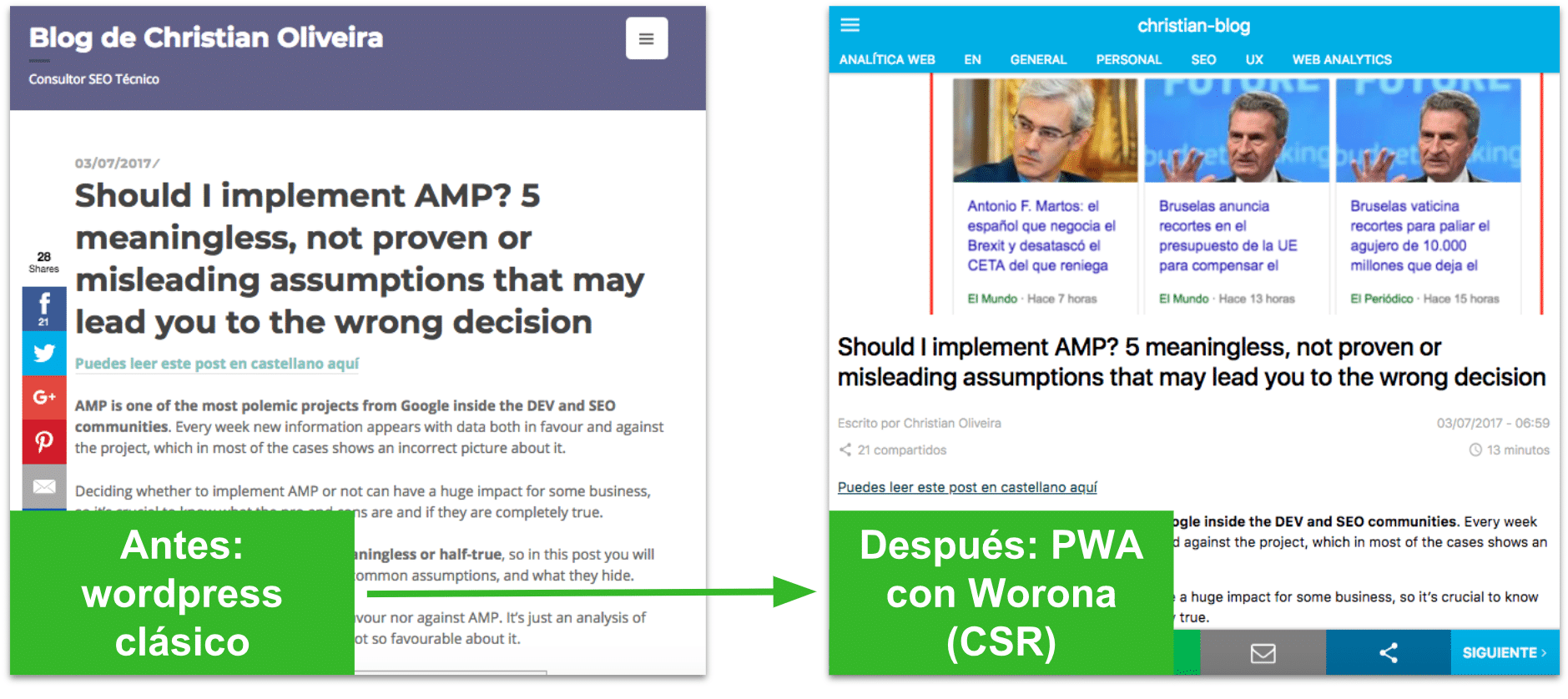
To test firsthand how Google handles JavaScript, we sacrificed our own blogs by migrating them from a “normal” WordPress to a PWA that works only with JS (CSR).
We did it with Worona (now Frontity), a platform for turning a WordPress site into a PWA for mobile users. In our case, we worked with them to modify the code so the PWA would load on both mobile and desktop, and so that we'd get a blank page when JS is disabled, simulating CSR. We did this because our blogs still aren't on mobile-first indexing, and we wanted the desktop version to be a PWA too.
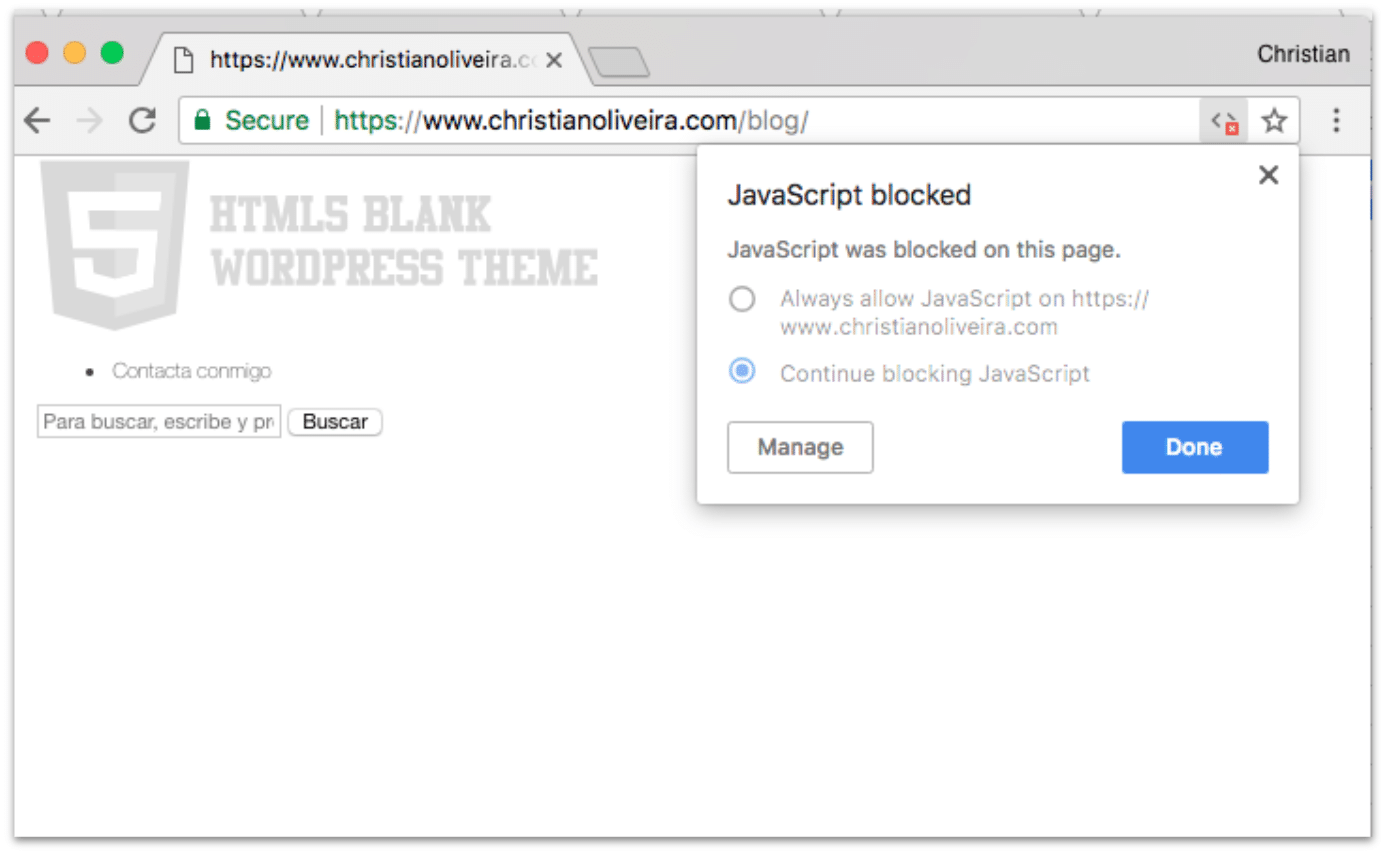
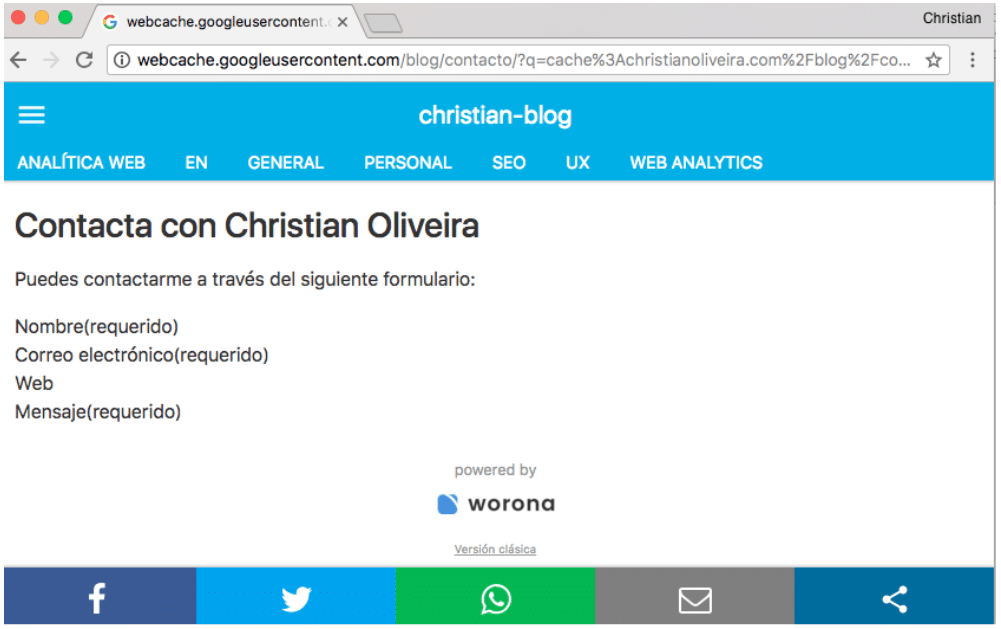
As you can see, if we disable JS, every page on the blog loads only what you see here: a practically blank page, with no content or links to crawl:
Once the PWA was live in production, we ran several tests. Keep in mind that, as you'll see, the tests were done on a small blog, over a short period of time and on a small scale. We can't guarantee that the results of this experiment will hold or be replicated in other situations.
Test 1: Rendering
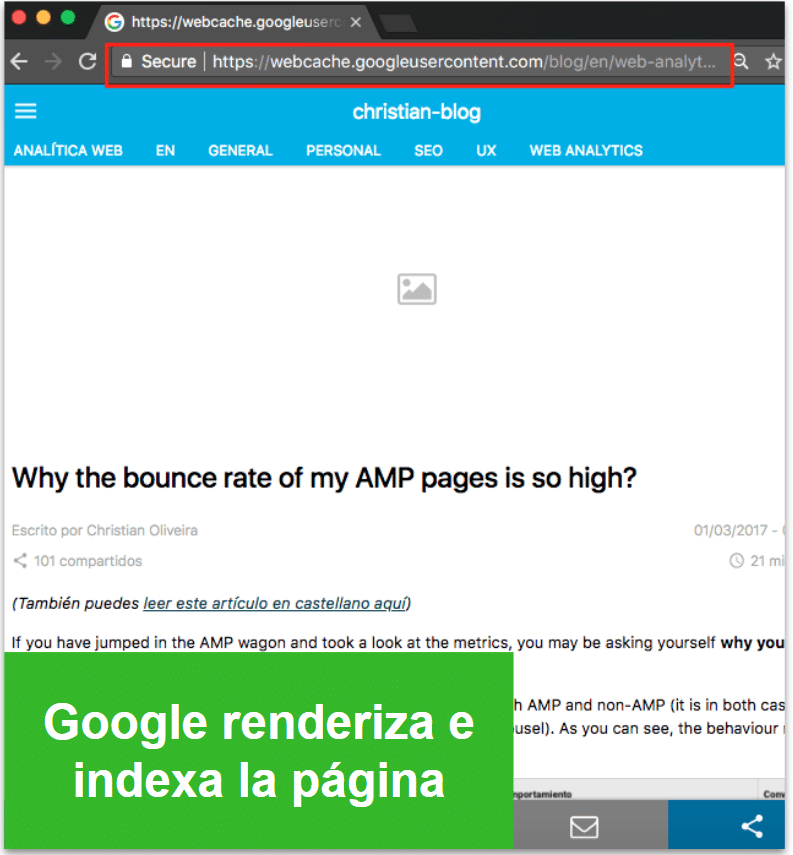
The first test was to check whether Google could actually render and index the blog's URLs, which only work with JavaScript. To do this, we first checked the Mobile-Friendly Test Tool and Search Console's Fetch and Render, where we can see that the content shows up. We used the “Request indexing” option to force Google to update that URL in its index, and in under 15 minutes we can see that it did:
Observations:
Google was able to render and index the content
The process was relatively quick (15 min)
Test 2: Rankings
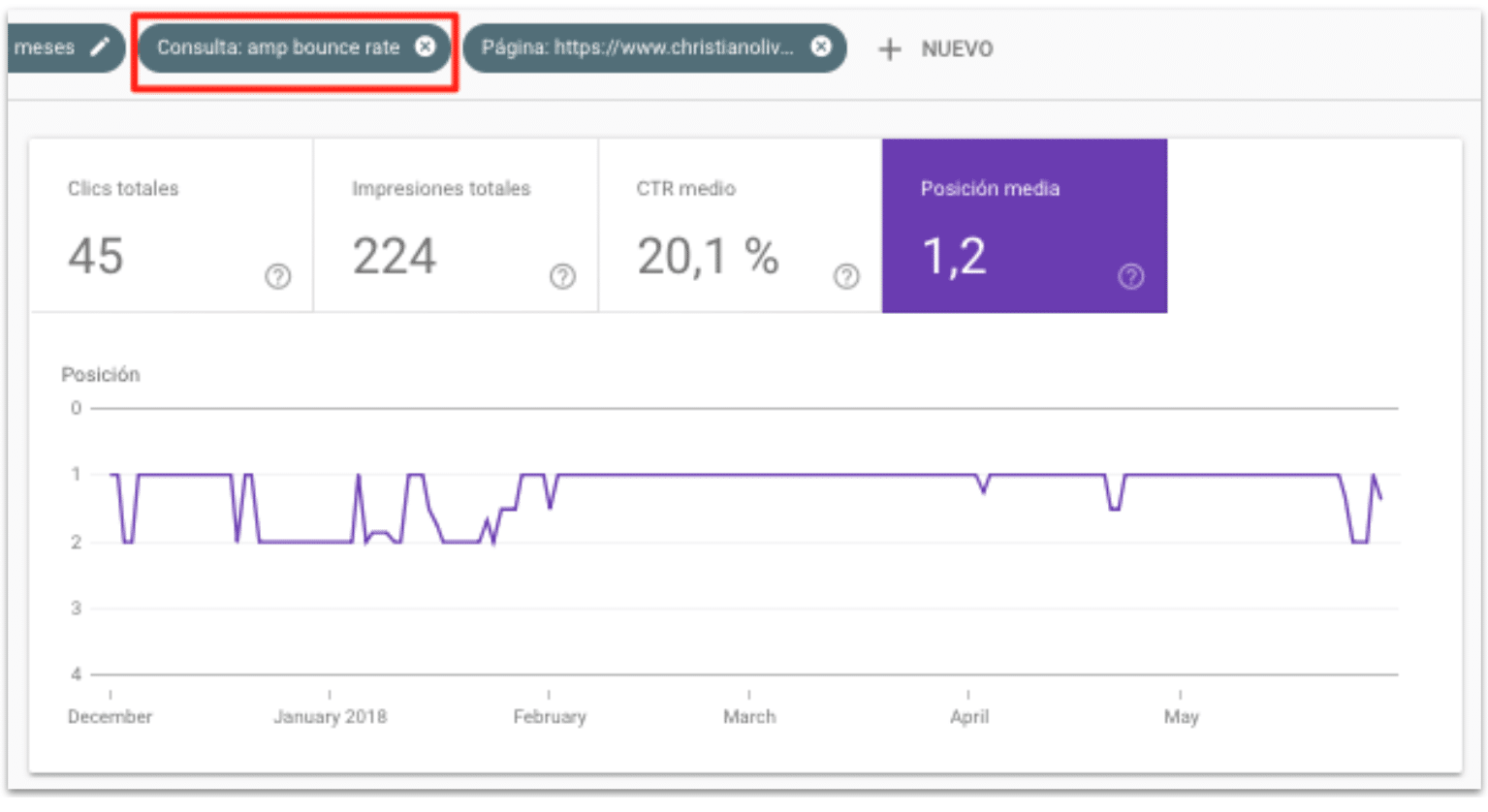
Once we know Google can render the JS and see our content, the next obvious question is whether it keeps our rankings for that post. To check, we picked a keyword the post had been ranking for in positions 1 to 2 for 6 months:
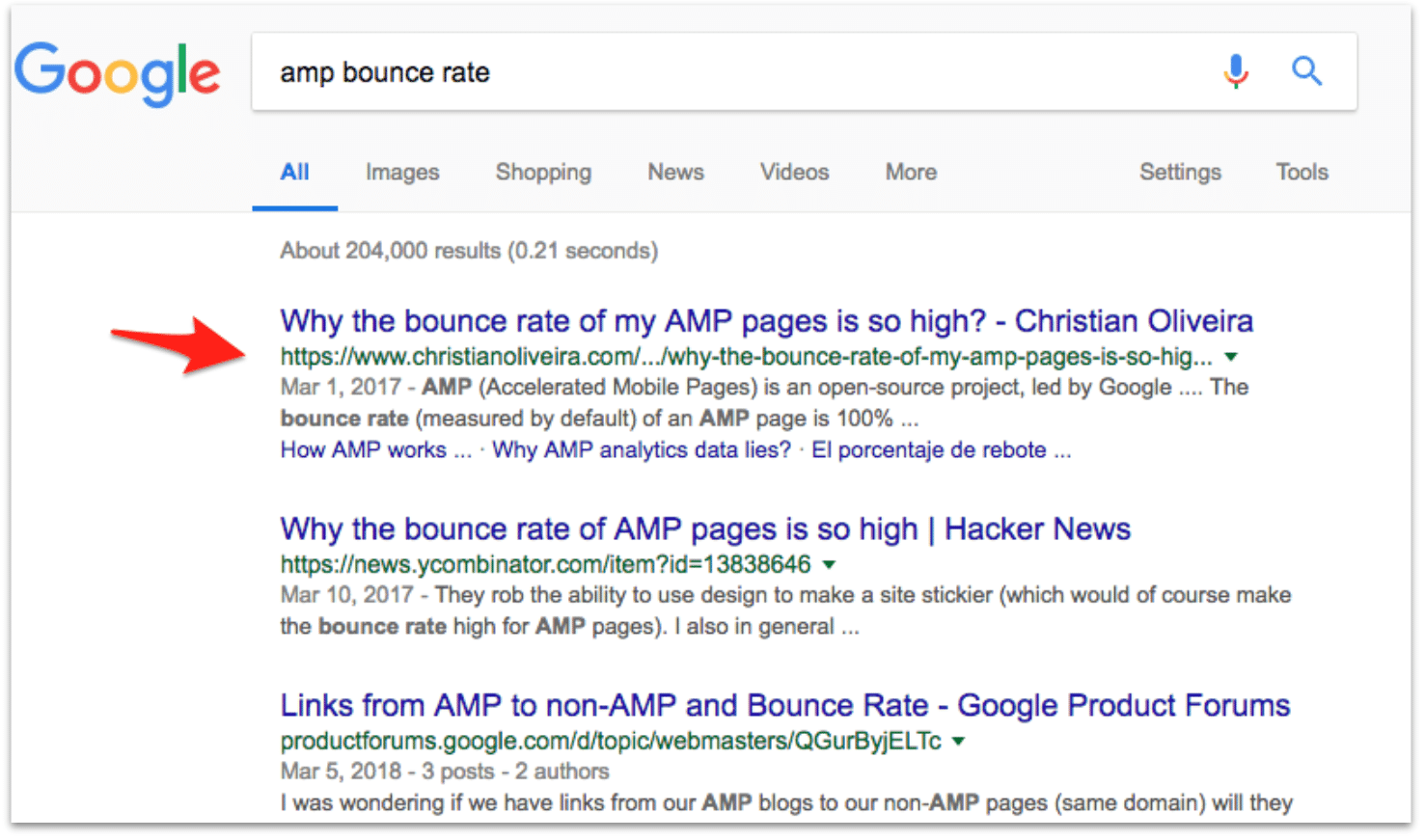
And we checked that, once Google updated this page in its index, we still held the same position for this search:
We also ran an extra search combining the keyword with a piece of text that appears in the PWA but wasn't in the previous version of the blog, to make sure Google is using the PWA version of the page:
Observations:
We didn't lose rankings by having the content in a PWA without prerendering.
Test 3: New Content
To check how long Google takes to discover, crawl and index a new post, we published one:
Since we don't want to force Google to crawl it, we run a Fetch and Render of the blog's home page (which includes a link to the new post) and request indexing of the home page, to see whether Google indexes the post.
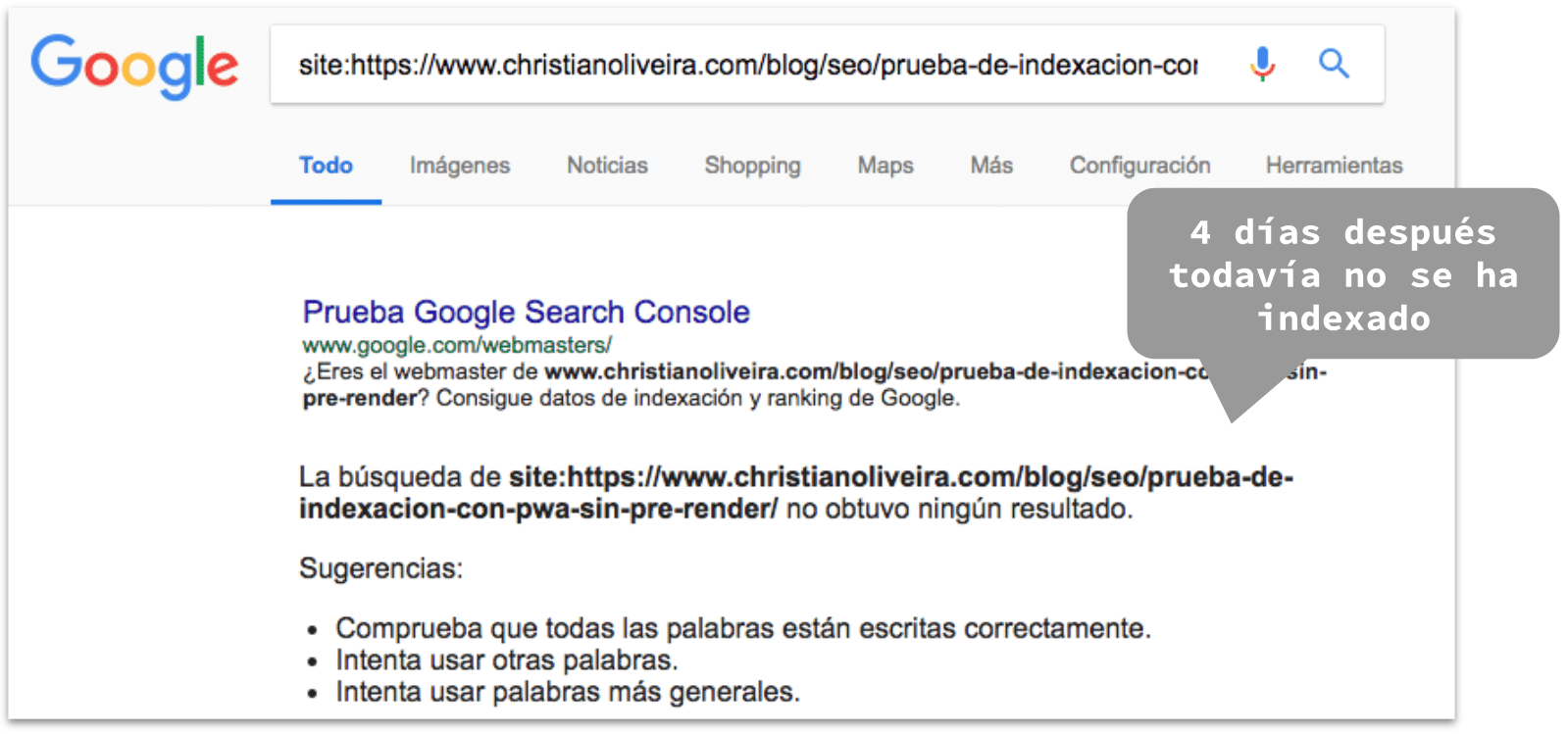
Even though a Googlebot visit to the URL showed up in the logs, the page didn't appear in Google's index until 5 days later:
One small mistake in this test was that the post had hardly any content, and the plugin we used (Worona) moves on to the next post when you scroll, so when Google renders the page, it's getting another post's content under this URL:
Observations:
If we don't force rendering and indexing of that content, Google will take longer to index the new content.
Test 4: The Two Waves of Indexing
Finally, we wanted to demonstrate the two-wave indexing system Google has confirmed. As in the previous case, because we ran the test with a URL that had very little content, Google ended up loading the next post that appears on scroll and indexing another post's content under this URL.
Here's what we did:
On a page Google hadn't indexed yet since the migration to the PWA, we made a change to include a made-up word only in the initial HTML that gets sent, which disappears once the JS loads
We forced Google to visit that page by doing only a Fetch (not Render) in Search Console and requesting indexing
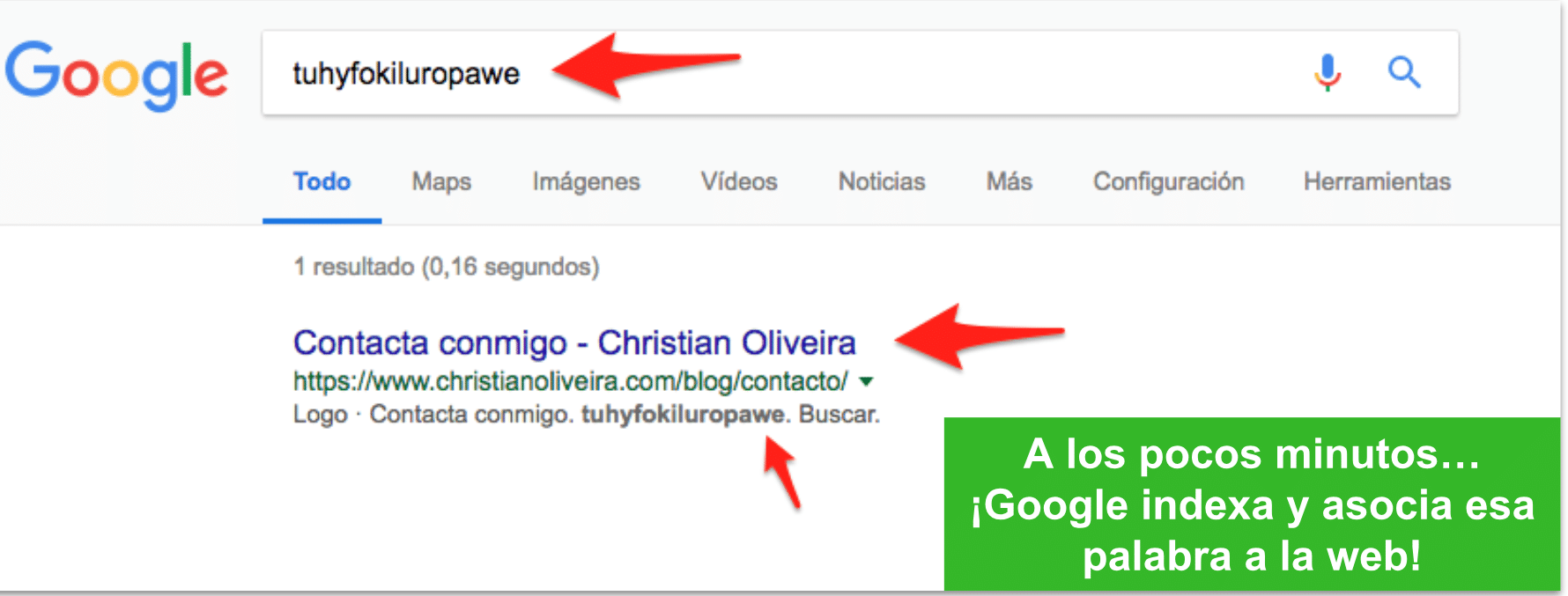
A few minutes later, when we search for the word, we can already see that Google has seen it and indexed it, and that the page shows up:
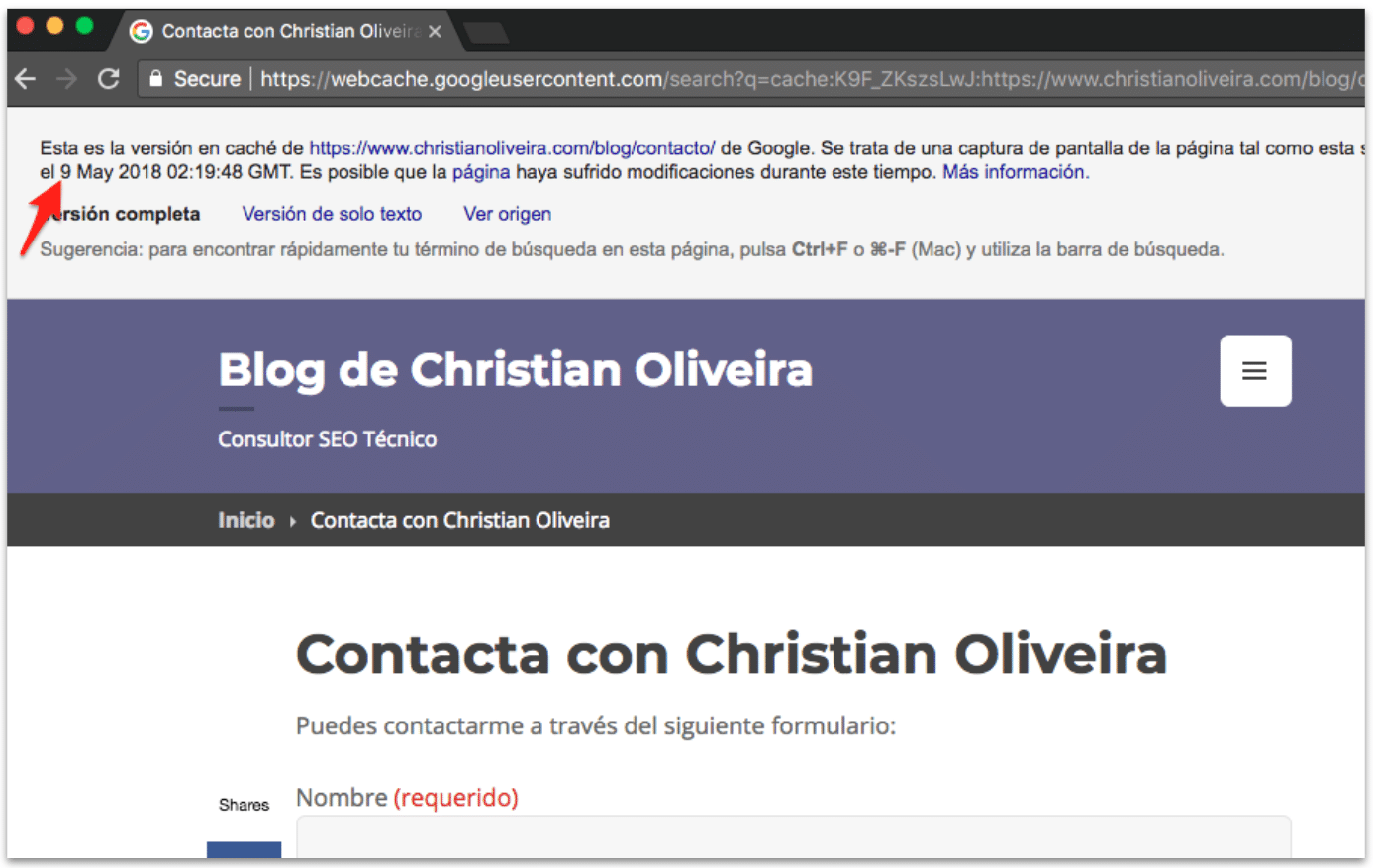
On the other hand, if we look at the page's cache in Google, we find that even though it has already indexed the new content (the new empty HTML with our made-up word), the cache still has the old version of the page:
Also, if we search for bits of text that appeared in the old version of the page but not in the new one, the page still shows up:
A few days later, Google shows the updated cache with the PWA version:
And from then on, the page no longer shows up for the word we made up, which only appears in the unrendered HTML. So it looks like Google didn't fall for the cloaking once it had rendered the page:
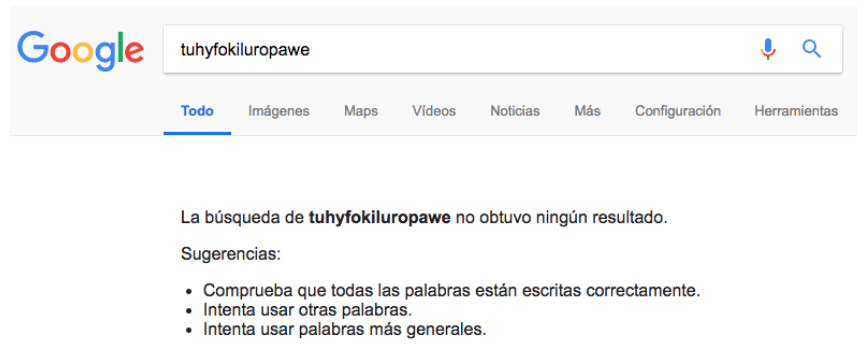
Even so, if we check the text-only version or the source in Google's cache, Google does have the word indexed. This also proves what we all already know: the text-only version only shows the raw HTML, so it's not the indicator to look at with CSR to see whether Google has a piece of content:
Observations:
Before rendering the page, Google indexed the content available without JS (first wave).
It associated this content with the previous version of the site (without the PWA).
Once it rendered the page, we only show up for the content in the final rendered version, and the content that was initially in the HTML but disappears once the JS runs is ignored (second wave).
Conclusions
As of today, very few sites have migrated straight to a PWA without prerendering (CSR) for all user agents. The ones that did and saw drops also had other technical problems (a very well-known example is hulu.com).
New sites that launched directly as PWAs without prerendering don't have trouble ranking, but they do have indexing problems. We've seen this in cases from people who let us analyze their sites and in our own experiments. The screenshot from Barry Adams' tweet we mentioned, showing Google's indexing after the move from CSR to SSR, is also very telling.
For Google, Dynamic Rendering is a solution that works, and we've been able to confirm it on client projects without any problems at all, as long as it's done right.
Today I've got a scoop for you: an interview with a Bing Quality Rater. Quality raters are simply people who help search engine bots improve their algorithms by evaluating a set of searches by hand. That's how search quality gets better. Someone already did an interview with a Google Quality Rater, but I don't think […]
In this article I present a framework for solving keyword cannibalization in SEO. We'll see how to prevent and fix it when several URLs compete for the same query, which lowers the visibility of all of them. All explained with real examples. At the end, I share a video and a script so you can […]