Web Agents and the Importance of Semantic, Accessible HTML
AI agents that browse the web, like the ones built on multimodal LLMs, run into complex HTML and interfaces designed for humans. Just like screen readers, many of these agents rely on the semantic structure and accessibility of the HTML to understand a page and act correctly. In this post, we'll look at how to make life easier for these new visitors to our websites.
To understand why semantics and accessibility matter, think of three layers that many browsers and agents combine:
What gets painted: the Layout Tree (what's visible, not the raw DOM).
What it means: the Accessibility Tree (roles, accessible names, relationships).
What gets extracted: a structured summary of the content (text, tables, forms) that serves as input to the model.
As I mentioned in the post on agentic traffic, there are two main approaches: visual agents, which process the page as an image, and DOM-based agents, which read the HTML tree or the accessibility tree. Visual agents can “see” buttons or images even when they have no text, though at a much higher computational cost. DOM-based agents are more efficient, but they only understand elements that have HTML or ARIA attributes; anything purely visual doesn't exist for them. In practice, hybrid agentsthat combine both approaches tend to be more robust and effective.
Either way, following good semantic HTML and accessibility practices makes agents work better. Below I'm sharing a set of evidence-backed recommendations, with code examples and references to studies and benchmarks like WebArena, Mind2Web and MiniWoB++.
Always use the right HTML elements instead of generic containers. The standards are pretty clear on this: “use native HTML elements whenever possible”. For example, don't use a clickable <div> for something that should be a button. Native elements already come with their accessible role and default behavior, which helps both users and agents.
<!-- Correct: semantic button -->
<button type="button">Play video</button>

<!-- Wrong: div with no semantics -->
<div onclick="playVideo()">Play video</div>
What's the difference?
A real <button> already knows it's an actionable interactive element and that it can be triggered with Enter or Space.
The <div> with onclick only knows that someone can click it, and nothing else.
Recent studies confirm that using native elements raises success rates and reduces failures in web tasks. So we should avoid anti-patterns that break agents, such as:
Fake button div: using onclick + role="button" without making it work with the keyboard.
No visible focus: if you remove the blue outline (outline: none) without providing an alternative, neither the user nor the agent knows where the keyboard focus is.
Weird order: using tabindex to change the natural navigation order.
Unnecessary ARIA: using ARIA attributes to replicate something HTML already has.
2. Give controls accessible names
Every interactive element should have an accessible name that describes what it does. The name can come from visible text, a <label>, an aria-label or an alt. In forms, for example, each field should have an associated <label for>.
And if you want to reuse text that's already on the page, use aria-labelledby. That way the screen reader will say "Total: €127.50 Pay now" instead of just "Pay now":
Browsers use the AccName algorithm to work out each element's accessible name. The algorithm follows a specific order of priority: first it checks for aria-labelledby, then it looks for aria-label, and finally it falls back to the element's visible text or its matching label for, depending on the type of element.
Screen readers and other assistive technologies get this information from the Accessibility Tree, where the browser has already worked out the name.
The best approach is to use label for as your first choice whenever you can, since it's the most semantic and widely supported option. Save aria-label for cases where there's no visible text that could work as a proper descriptive label.
3. Add alt text to images
Any image that carries information should have a descriptive alt. If it's decorative, leave the alt empty. For example:
<a href="/promociones">
  <img src="promo.png" alt="Promo: 50% off your subscription">
</a>
More than half of online banners have no alt, so they become invisible to agents and screen readers. Even with multimodal models, well-marked-up text data takes priority over fuzzier visual signals.
Doing this gives agents clear landmarks. For example, the Mind2Web benchmark found that filtering the DOM down to relevant, structured nodes cut the noise almost in half while keeping 95% of what mattered.
On top of that, the study Understanding HTML with Large Language Models showed that general-purpose LLMs can already learn to understand HTML and outperform models designed only for synthetic environments like MiniWoB. The paper MarkupLM: Pre-training of Text and Markup Language for Visually Rich Document Understanding also confirms that training the model on the text and the HTML markup together improves results on question answering and extraction tasks on web pages. It's no coincidence that RAG frameworks like LangChain include utilities like HTMLHeaderTextSplitter, which use headings directly to do a better job of splitting content into chunks that models can process.
One nuance, though: even without "understanding" the semantics of your classes or CSS, an extractor can do a very good job of guessing what's content just by looking at local quantitative signals. In fact, using just the number of words per block and link density led to big gains in IR (Boilerplate Detection Using Shallow Text Features), work that inspired Chrome's DOM Distiller.
These days, Blink (Chrome's rendering engine) uses an even more sophisticated system called Annotated Page Content (APC), a structured tree with content, geometry and interactivity that's generated from the layout tree (what actually gets rendered), not from the raw DOM. It can be exported as structured Markdown or as passages to feed AI models. In other words, good structure (headings, regions) and avoiding bloated templates cut the noise for agents and reader modes.
How to check your structure
To quickly check whether your page is well organized, open your browser's developer tools (F12) and go to the "Accessibility" tab. There you can check that the headings follow the right order (H1, then H2, then H3) and that each element has a clearly defined purpose (role and name).
It's also a good idea to use tools like Lighthouse or to install extensions like axe DevTools, which analyze your page and show you accessibility issues.
5. Add semantic hints to visual or dynamic content
Hidden but accessible text: add a <span class="visually-hidden"> with the message to image-only banners.
Semantic overlays: placing a transparent <a> with an aria-label over a banner lets the agent click it.
Describe dynamic changes: use attributes like aria-live or aria-expanded so the agent knows what has changed.
Prefer static states: use frames or text instead of animations that disappear.
Block the background behind a modal with inert: it stops the agent from interacting with things it shouldn't touch while a dialog is open.
Communicate async states: use aria-live="polite|assertive" and aria-busy="true" while results are loading. Example:
The Machine-Readable Ads study found that these techniques turned invisible ads into elements AI agents could detect and click, without hurting the experience for humans. Specifically, adding things like off-screen <span> elements, appropriate ARIA roles and semantic overlays made elements that LLMs used to ignore reliably clickable.
6. Optimize your design for automated browsing
Key content at the top. Many agents don't scroll past the first screen or two, so make the essentials visible early.
Make your site responsive without hiding features. Whatever you offer on desktop should also be on mobile and reachable by click or keyboard, not just on hover.
Delay browser permission requests. Notifications, geolocation and the like block many agents. Ask for them only when they add immediate value (not on page load).
Well-built modals, not intrusive “pop-ups”. Use <div role="dialog"> in your HTML with accessible buttons. Example:
Metadata like Schema.org helps information get understood without ambiguity. It doesn't replace basic accessibility, but it complements it. For example:
This would let an agent pull the price directly, with no ambiguity.
7.1 What we know from documentation and academic research
Papers like Schema2QA show how a well-defined schema can be used directly to generate question-answering agents with good accuracy, and the Schema.org Action annotations paper shows how annotating web APIs lets assistants carry out actions like booking or buying. In the case of Schema2QA, the authors measured 64–75% accuracy for question-answering agents built directly on Schema.org, and 60% on popular restaurant questions, on par with Google Assistant (7% lower than Siri and 15% higher than Alexa). And with Action annotations, they showed that assistants could make bookings or purchases automatically by reading these annotations. This tells us that Schema.org isn't just an SEO resource; it could also be useful infrastructure for agents.
But, as we saw in section 4, general-purpose LLMs already read raw HTML reasonably well when the document is clean and the structure is consistent. You don't need to “teach” them a special syntax; what helps most is keeping things in order, writing good headings and labeling controls.
7.2 What we're seeing in practice today with the big chatbots in AI Search
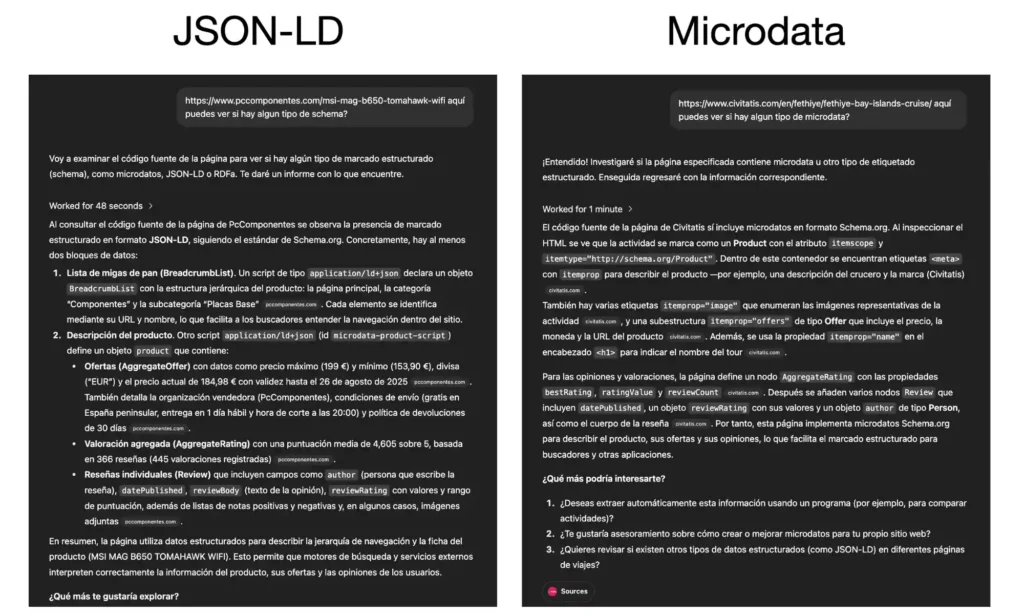
What ChatGPT/Gemini/Claude get when they “read” a URL is usually a flat, reader-mode-style extract: no tags, no scripts and no attributes. And that's the catch: the Schema is inside a <script> tag, so it's invisible. And even if you use microdata instead, the same thing will happen.
But there are 4 scenarios that change the outcome:
Access for training: here it depends on where the dataset comes from.
- In their own crawls (GPTBot, or Googlebot with the Google-Extended token), some models may parse JSON-LD/microdata and use it as an extra signal, while others only index the plain text. But there's no way to know which specific model “understands” your Schema and which doesn't, because each provider has its own opaque pipelines.
- When the information comes through Common Crawl or other public repositories, the Schema context is usually lost and only simplified HTML is kept.
- On top of these, there are licensed or user-contributed datasets, where there's no guarantee of how the Schema is processed either.
Access through the SERP (Google/Bing): when the assistant/agent looks up search results, if those results include structured information in the form of rich snippets, the chatbot can read it, because the search engine has already indexed your JSON-LD/microdata Schema and exposes it in its snippets. I noticed this because when I ran searches in ChatGPT on a client's topic, the client's products always showed up with an attribute whose information was only in the JSON-LD. But if I asked ChatGPT to open the product page and forced it to scrape the page with its tools, it saw neither the Schema nor the version with that attribute (because it was client-side rendered).
Direct access by scraping the page: if you force the chatbot to go in and “read” the HTML with its tools, it won't see the Schema because it only keeps the plain text.
Access through browsing agents: agents that render and navigate a real DOM can process the full document and therefore access both JSON-LD and microdata to interpret the page and what it does. As for whether they actually use it for anything, I don't know yet.
Browsing agents that process the full DOM do interpret structured data correctly.
Technical confirmation: Blink itself (Chrome's rendering engine, which we mentioned earlier) has text extraction paths that strip out scripts and segment the document by its HTML structure (headings, semantic regions). In that flow, JSON-LD inside a <script> simply doesn't make it into the final output, unless the agent renders the full DOM and accesses APC (Annotated Page Content).
Does this mean Schema is useless? While it's true that Schema isn't a ranking factor and Google has said it hopes not to depend on it in the future, the reality is that today it's still an important piece of semantic SEO and of entity disambiguation and building, which is needed at the indexing stage. And let's not forget the most important thing: for LLMs to find and mention you, you first have to be in Google's index.
7.3 What happens when you generate schema with LLMs
That said, be careful about letting an LLM generate this markup. The LLM4Schema.org study found that models like GPT-4 generate more complete Schema.org markup than humans in many cases, but they also make mistakes or invent properties, which can result in invalid markup. So it makes sense to use AI as a helper, but always validate the output with official tools. The same study puts a number on the problem: up to 40–50% of the automatically generated markup turned out to be invalid or made up. That's why you should use AI as an assistant to save time, but never as a replacement, and always validate with the official Schema.org validator or Google's Rich Results Test.
8. Conclusion: Semantic, accessible HTML makes AI agents work better
Semantic, accessible HTML doesn't just help users with disabilities; it also makes AI agents work better. Using the right elements, labeling and structuring content properly and adding metadata gets our pages ready for the next generation of agents. Semantic HTML is the foundation of accessibility, and now we can also say it's the foundation of AI readiness and Agent Experience.
You could say that if a screen reader understands it well, an agent will also have a much better chance of completing the task.
Update (May 2026): Google and OpenAI confirm it
Eight months after I published this, both Google and OpenAI have come out and said basically the same thing.
Design with the idea that the agent sees your site through screenshots, raw HTML or the accessibility tree, not the way a human sees it on screen.
Prefer native semantic HTML over styled divs, because the role and behavior come built in and you don't have to reinvent them with ARIA.
Pay attention to stable layouts, labels properly wired to their inputs, and explicit cursors on clickable elements.
Treat the accessibility tree as the real map of your site for machines, and audit it with DevTools.
They back this up in their AI optimization guide too, where they stress that semantic HTML helps screen readers (and note that browsing agents work in a very similar way) navigate the page more easily. They also say you don't need llms.txt files or Markdown to show up in AI search, and that structured data isn't required either, and there's no special schema to add. Basically, anyone who knows even a little about how an LLM works will understand why.
"ChatGPT Atlas uses ARIA tags—the same labels and roles that support screen readers—to interpret page structure and interactive elements. To improve compatibility, follow WAI-ARIA best practices by adding descriptive roles, labels, and states to interactive elements like buttons, menus, and forms. This helps ChatGPT recognize what each element does and interact with your site more accurately."
In other words, the line I closed the post with — if a screen reader understands it well, an agent will also have a much better chance of completing the task — is no longer a reasoned hypothesis. It's the official recommendation from the two biggest players. Accessibility + semantic HTML = the foundation of Agent Experience.
OpenAI shut down Atlas on August 9, 2026 and moved its agentic features to ChatGPT Work, "an agent for longer, more involved tasks", which since August 25 can complete tasks on sites where you're logged in.
Then, on August 31, came the next step: "Site tools use WebMCP". ChatGPT Work and Codex can use the tools a site declares with WebMCP from the desktop app's built-in browser. In other words, besides reading your HTML and your accessibility tree, the agent can call functions you expose to it. I go into this in this post on Gemini Nano, WebMCP and the Decisions API.
Ever since I started building automations with LLMs, I've always tried to structure my prompts. I explained this a while ago in this talk (minute 48:30, and here's the Google Colab I used), where I said that models don't really "speak" JSON, Markdown, YAML or XML, but these structured formats can help you get more […]
How measurable AI-generated traffic is depends a lot on the type of traffic: a training crawler is not the same as a human click from a citation, and an on-demand fetcher is not the same as a browsing agent. These tables sum up where things stand as of October 2026, broken down by service, measurability […]